Solved Microsoft Teams Integration V18

Status
Not open for further replies.

hrem

Customer
Joined
Jul 20, 2021
Messages
4
Reaction score
3
You need v18 Beta 1 from 3CX.
Currently, it is available in all editions, later only Enterprise on the final release.

On your MS365 licensing you need to have a business subscription, the smallest would be F1.
Free (personal) accounts don't work for direct routing. To enable the dialer in teams, you need to add to your MS365 subscription the add-on "Phone System" or "Business Voice". Both are monthly additional charges from Microsoft.

Once you have all the above, then you can configure it from 3CX > Settings > MS365 > Teams Direct Routing.
https://www.3cx.com/docs/microsoft-teams-business-voice/

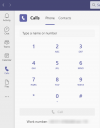
The end result is that you can call and get called within your teams app.
1626779599406.png
 
  • Like
Reactions: VoIPTools
You need v18 Beta 1 from 3CX.
Currently, it is available in all editions, later only Enterprise on the final release.

On your MS365 licensing you need to have a business subscription, the smallest would be F1.
Free (personal) accounts don't work for direct routing. To enable the dialer in teams, you need to add to your MS365 subscription the add-on "Phone System" or "Business Voice". Both are monthly additional charges from Microsoft.

Once you have all the above, then you can configure it from 3CX > Settings > MS365 > Teams Direct Routing.
https://www.3cx.com/docs/microsoft-teams-business-voice/

The end result is that you can call and get called within your teams app.
View attachment 23051
Is it possible to update the docs about that?

It isn't very clear...

1. What do we do with the Teams FQDN? Should we configure that somewhere?

2. The phone numbers for each users, should they be unique?

3. I think the Dial Plan script has a couple mistakes with the internal calling, is it possible? I saw a "^(\d{2})" and I use 3 digits ext. Just above that there's the "(\d{3})".

4. Port 5062? It'd be nice if it was specified somewhere other than the Direct Routing page of the settings.

By the way, I fully agree it should be Enterprise only for that. If a company has a budget for Teams Business Voice, they can pay an Enterprise license lol
 
Last edited:
1) The team FQDN needs to be in your email domain and then point to your 3CX IPv4 Address

2) No, but they generally should be the outbound caller ID as you can sync this also to 3CX

3) I assume you are using the US dial plan. This writes for 3 digits 3CX
'^([0-9]\d{2})$' and this is correct

4) It is not always 5062, if your 3CX is installed already under an FQDN in your email domain it will remain on 5061.

There is a video of mine on the way which will clear things more up...
 
  • Like
Reactions: jed and Evolute IT
1) The team FQDN needs to be in your email domain and then point to your 3CX IPv4 Address

2) No, but they generally should be the outbound caller ID as you can sync this also to 3CX

3) I assume you are using the US dial plan. This writes for 3 digits 3CX
'^([0-9]\d{2})$' and this is correct

4) It is not always 5062, if your 3CX is installed already under an FQDN in your email domain it will remain on 5061.

There is a video of mine on the way which will clear things more up...
Okay, the script generated uses 5062 and I did open the port. Can you elaborate on the possibility of 5061? Should I just change it in Teams Admin?

Inbound calls are ringing my Teams, which is good, but I can't seem to be able to make outbound calls using Teams. The call never reaches the 3CX logs.

Where can we debug this feature?

As for the FQDN, I did point it via A-record to the PBX IP,'not sure what it will change.
 
when the script states 5062 you must use it - don't change it!
The reason for 5052 is that 3CX SSL runs already on 5061
 
  • Like
Reactions: Evolute IT
Inbound calls are ringing my Teams, which is good, but I can't seem to be able to make outbound calls using Teams. The call never reaches the 3CX logs.

This indicates to me that a cert is not one MS accepts, 5062 TCP is blocked or the FQDN is not pointing to 3CX.
If you had some dial plans before configured in MS DR, then this is also something that can go wrong.

If you just made the setup, for sure grab a coffee and give it at last 1h (may up to 24h) until teams (lync) is ready internally...
 
Last edited:
This indicates to me that a cert is not one MS accepts, 5062 TCP is blocked or the FQDN is not pointing to 3CX.
If you had some dial plans before configured in MS DR, then this is also something that can go wrong.

If you just made the setup, for sure grab a coffee and give it at last 1h (may up to 24h) until teams (lync) is ready internally...
So, I did set 5062. Good thing to know that 5061 is 3CX TLS, but it did tell me "Secure SIP needs to be restarted" after I uploaded my certs, and it is a Sectigo so it is valid according to Microsoft. It's a wildcard.

We removed any prior config and I actually did the setup yesterday morning.

Where can I see logs of that integration? Maybe I can see incoming calls or something.
 
Wildcards are not supported on SIP TLS by 3CX. it must cover the domain and the SBC domain only.
That's not what Teams docs say.

So I would need a new cert just for this? Kinda redundant.

And why does the SSL docs of 3CX says it does support wildcard certs?

All this is really not clear. I know it's Alpha but the doc needs more details lol
 
Documentation is already up for a general update.

Reg the wildcard cert for SIP that this is not allowed:
https://datatracker.ietf.org/doc/html/rfc5922#section-7.2

For a test, I could generate you a 90d test cert for your domain.
Can't I generate one myself? What do you use?

I would indeed want to test because if that's the issue, I'm stuck with no cert (I have 6 already, I cannot buy another one just for a subdomain lol)
 
I cannot tell you if you can do this also or not, you would need to google.
I only know that we have a cooperation with one who does allow me to do this.

And if you are happy to pay for one user on Teams to make calls 80$ MS Add-Ons per year, then the cert is the least "evil". PM me a CSR and be ready to accept confirmation on [email protected] if you like.
 
Last edited:
I cannot tell you if you can do this also or not, you would need to google.
I only know that we have a cooperation with one who does allow me to do this.

And if you are happy to pay for one user on Teams to make calls for 80$ MS Add-Ons per year, then the cert is the least "evail". PM me a CSR and be ready to accept confirmation on [email protected] if you like.
Alright I'll setup a CSR. The emails should already be good.

Good thing you have a partner for this! Give me a few.
 
Just installed the SSL and did a reboot of the server (it didn't prompt for a restart of the service this time so I didn't take any chances.)

It seems to still not be working. I will give it some time and try later to see. I do see the TLS packets in a capture but can't read them lol
 
define what you mean it is not working?
details help, screenshots from teams also etc
 
define what you mean it is not working?
details help, screenshots from teams also etc
The call from Teams to 3CX says : "We couldn't complete the call", and I see nothing in the activity log. 3CX to Teams still works.

Microsoft seems to still think there's a SSL error for some reason:
1626889217002.png

I tested the certificate on my web sever and it is valid and working, so I have no idea what isn't working here.

In a PCAP, I only see TCP TLS traffic from one of Teams IPs to the PBX, but only 1-2 packets, nothing else.
 
I can tell you that telnet on your 5062 port does not answer. 5060 and 5061 does...
 
Status
Not open for further replies.

Forum statistics

Threads
112,148
Messages
590,963
Members
165,169
Latest member
Isaac415