Missed call notifications

Status
Not open for further replies.

Arlanet-Lennard

Free User
Joined
Feb 28, 2022
Messages
11
Reaction score
1
Hello,

With the v18 Teams integration, I'm seeing an inconsistency when it comes to the call log: Teams will regularly mention a call as missed even though it got accepted.

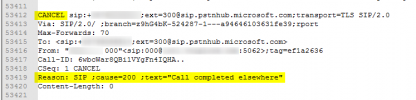
After reading this: https://docs.microsoft.com/en-us/microsoftteams/direct-routing-call-notifications - I wonder if the "REASON: SIP; cause=200;text”Call completed elsewhere”" message is properly implemented, or if this requires additional configuration on my side in either Teams or 3CX.

Out situation:
- We have a 3CX instance hosted by a 3CX partner
- We have a local SBC in the serverroom.
- We have on-premise phones which use said SBC.
- Teams is configured using the Direct Routing pointed at the PBX instance by the 3CX partner.

All this works great and we are really happy with it. But the missed calls that aren't missed calls bother me. In the above link it is explained this could happen if the 3rd party SBC (aka: 3CX according to Microsoft) accepts the call, but doesn't sent the right SIP message. However, I have disabled access to the 3CX clients for all users, so none is able to call outside of Teams except for the handful of on-premise phones, which I can see in the logs were not used. So I don't feel this is relevant to the problem...

What am I missing?
 
Hi!

I just double-checked our logs and when the 3CX Server wants to send a CANCEL request because another endpoints that is registered on the same extension answer the call, what we send to Microsoft is this:
1646992916399.png

This is a snippet from the logs I tested with to ensure we send the correct thing.
Also I should note that I tried this scenario on a V18 U3 installation (that's where the log is from...) and in my case it does not appear as a missed call.

Is your 3CX installation up-to-date?
 
Hello Nick,

I was waiting for a non beta version of update 3, so just hit the button. We were om v18 U2. I'll see if this changes anything, otherwise I'll have to investigate further.

If the message turns out to be properly sent, is there anything on the Teams side I can check?

Also, where do I find the log from your screenshot?

Thanks!
 
I was waiting for a non beta version of update 3, so just hit the button. We were om v18 U2. I'll see if this changes anything, otherwise I'll have to investigate further.
Sounds good, let me know how it goes.

Also, where do I find the log from your screenshot?
This only appears when you enable the full debug mode which spits out A LOT of logs, you can see this from the line number and this was from a system that was running for 2 minutes and had 2 calls, so if you want to enable this after the upgrade to U3, send me a PM and I'll give you instructions.

I don't want the instructions out public because if it is not disabled, you can bet your hard disk will be full in 2-3 hours max.
 
Hello Nick,

Let it run for a day. Logged in at the end of the day. Had two missed calls in my call log in Teams, while 3CX log clearly says someone accepted the calls.

Either something is not configured right, or this is a Teams flaw: if you weren't logged in at the time of calling, it will always show as missed? Seems silly.
 
Hello Nick,

Let it run for a day. Logged in at the end of the day. Had two missed calls in my call log in Teams, while 3CX log clearly says someone accepted the calls.

Either something is not configured right, or this is a Teams flaw: if you weren't logged in at the time of calling, it will always show as missed? Seems silly.
At the time of the 2 missed calls, what was logged in, your Teams Client, your 3CX Client, or none of the two?
 
At the time of the 2 missed calls, what was logged in, your Teams Client, your 3CX Client, or none of the two?
Logged in neither of the two. Just had it again, so pretty sure that's the issue.

Just started PC and Teams, two calls tagged as missed, 3CX log shows as accepted.

Collegae who was online at the time has them shown as incoming, rather than missed. They do report however that the call log shows it as incoming, but the status feed as missed.

Seems some weirdness in Teams is happening :/
 
Seems some weirdness in Teams is happening :/
This does sound like some Teams weirdness if I understand correctly the scenario, unfortunately there isn't a lot we can do in this case.
The 3CX Client though when you launch, it is OK, correct?
 
Just checked, haven't launched the 3CX client in a while. Apparantly that call log doesn't update if you don't have it running.

I went back in time when I did have it running:
- missed call in 3CX client.
1647256720985.png
- same call in Teams, missed.
1647256751420.png
- missed in 3CX call log, so this one is fine.

1647257230208.png

However, literally few hours before:
1647257274595.png
1647257332015.png
1647257392574.png

So what happened here was:
- The call came in on the public number
- It got forwarded to the call group (Alles en iedereen)
- Then Kasper took the call.

This is the setup every time. Call comes in, gets forwarded, someone picks up. Only sometimes you see the "hops" in the call log, and sometimes you don't. So I feel this is an issue in 3CX in some way as well.

When the call transfers, it somehow registers itself als not answered.

EDIT: Mind you, the 10th was before I updated to 18U3. The difference between the two logs is the first one was a direct number to a single call group, the other one is call to a generic number, which then forwards to a call group. Hence the multiple hops. I wonder if it's possible to tag a call as not missed when it's forwarded to another call group.
 

Attachments

  • 1647256947562.png
    1647256947562.png
    4 KB · Views: 3
Last edited:
Some additional information. After reading: https://www.3cx.com/community/threads/ring-group-missed-call-notification.82243/ - I figured it's intended that a Ring Group is flagged as unanswered, when it forwards to another group.

However, in the above screenshot, this one to be exact:
https://www.3cx.com/community/attachments/1647257392574-png.28672/

This is the situation:
- There is a Ring Group called "Hoofdlijn", which can be called directly.
- After 1 second* (if none answers), it forwards to Ring Group "Alles en iedereen".
- Both are set to a Ring All strategy.

* It's set to 1 second because our receptionist is on leave.

This means if you look at the screenshot and go by the information in the forum post:
- The incoming call of 1 second is intended to be flagged as missed in "Hoofdlijn".
- The forward to "Alles en iedereen" is NOT intended to be flagged as missed, since Kasper answered the phone there.

So, something is clearly going wrong somewhere in 3CX.

I read that moving over to a Call Queue might fix it, but we answer the phone within 1 minute all the time, so I don't really see the benefit over a Call Group. Are there any downsides? We're also not a support desk, a client calls and immediately gets to speak to a developer.
 

Attachments

  • 1647269979541.png
    1647269979541.png
    15 KB · Views: 2
OK, let's forget about the Teams Client for a moment to sort things out. Just using the 3CX Client, try this:
  1. Make a call from an External Number to Ring Group A ("Hoofdlijn")
  2. 1 second later, the call will be forwarded to Ring Group B ("Alles en iedereen")
  3. In RG B, Kasper answers.
In your 3CX Client, do you see 1 Missed Call or 2?
Is your extension in RG A, RG B, or both?
When Extension Status was your Extension in when you made the call (Available, Away, etc...)?

I would also advise you upgrade to V18 U3 as well before testing this so we are all on the same page.
 
Alright.Did both situations. With Teams on/3CX off and Teams off/3CX on. We're on v18U3 :) All extensions are forced available (none can change status). I'm only in B.

T1: Teams off/3CX on.
1. Call goes to A, my extension is not in that group, so no log.
2. Call forwards to B, my extension is in that group and rings.
3. Someone else picks up, call disappears, nowhere in log. If I now turn teams on, the call log reports the incoming call as missed.

T2: Teams on/3CX off.
1. Call goes to A, my extension is not in that group, so no log.
2. Call goes to B, my extension is in that group and rings.
3. Someone else picks up, Teams now reports as incoming, instead of missed. 3CX Client has no record.

Basically, I want the situation of T2, but also when Teams is offline.

Maybe the issue is with extension statuses? As said: all extensions are always set to available so forwarding to Teams is not disturbed. None has access to the 3CX client and thus cannot update their status. Perhaps because of the always available status, the Teams integration will forward the call, find out you're not actually online and instead of forgetting about it, it logs it as missed. Is there a way to sync Teams status without resorting to a Calendar sync? Although that might be an extreme solution... Perhaps a particular SIP message can tell Teams not to bother logging a missed call?

EDIT: Yikes. https://www.3cx.com/community/threa...rs-teams-status-not-working.86914/post-410312 - Any update on that?
 
Last edited:
Hi!

T1: Teams off/3CX on.
1. Call goes to A, my extension is not in that group, so no log.
2. Call forwards to B, my extension is in that group and rings.
3. Someone else picks up, call disappears, nowhere in log. If I now turn teams on, the call log reports the incoming call as missed.
I have tried to replicate this following the exact same steps out outline and I have not been able to so far.
You say "Someone else picks up". Do you mean that someone else picks up using a dial code maybe, like *20*? Or you mean someone else in RG B?

No, there is no update. This is something we may consider as an improvement in the future though
 
Status
Not open for further replies.