Missing config file in email for windows app

Status
Not open for further replies.

feestbeestzaandam

New User
Joined
Jun 6, 2009
Messages
27
Reaction score
0
I am using 3cx v16 (16.0.611)
My HardDisk chrasche and i made no resend backup, I KNOW ITS REALY STUPID!!!

I had a old backup and i thought that it would work,it did and also sending welcome mails WITH a config file.

After the last 2 updates 4 and 5 if i am right, i got a welcome mail, but only with a pdf with al sort of info, but NO config file.

Its possible that i did something wrong or that a update made this setting.

And i realy need it voor all the windows laptops/pc's .
I prefer the app instead of web/chrome (older famely all over the world).

What did i wrong and how can i fix it.
 
Try making a new extension and see if that sends the config in the welcome email.
 
Try making a new extension and see if that sends the config in the welcome email.

I already did that.
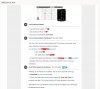
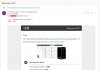
But because you asked me i did it again and here is the result.

I got the mail not automatic, i have to send manual the welcome mail.
But that can be normal.
I hope that this helps you or others to see what i or my pc do /did wrong.


1 van 2 welcom mail.jpg2 van 2 welcom mail.jpg
 
Use 3CX's SMTP server and test again.

otherwise, did you modify the welcome email template?
 
Use 3CX's SMTP server and test again.

otherwise, did you modify the welcome email template?
I Always use the scx smtp server because its a free version and then i have no other choise.
And no i did not change the template.
I use all standard settings accept the ports for sip.
And i reseved all the mails but only with 1 atachment a pdf

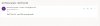
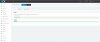
here you can see the immages of the test.mail from smtp server.jpgmailserver 3cx smtp.jpg
 
Ok try changing the email address recepient on an extension to say a gmail or outlook.com account. to check the attachment isnt being blocked. Then I would check the email/anti-spam logs to see if its being stripped.
 
Ok try changing the email address recepient on an extension to say a gmail or outlook.com account. to check the attachment isnt being blocked. Then I would check the email/anti-spam logs to see if its being stripped.
i already tryed to a gmail adres.
same result.

But where and how can i check email spam logs to check if somthing gone wrong?
 
if you go to
Settings > Parameters
search for "ATTACH_3CXCONFIG_WELCOMEEMAIL"
set to 1 and then the config file should be sent with the welcome email.
 
if you go to
Settings > Parameters
search for "ATTACH_3CXCONFIG_WELCOMEEMAIL"
set to 1 and then the config file should be sent with the welcome email.
I did not find the "ATTACH_3CXCONFIG_WELCOMEEMAIL".
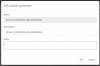
So i add "ATTACH_3CXCONFIG_WELCOMEEMAIL" (see picture) and now it works!!!:):)
attach_3cxconfig_welcomeemail.jpg
And as a bonus i have also the qr code in the email.

I dont knowwhy or whats happend that the "key" "ATTACH_3CXCONFIG_WELCOMEEMAIL" was gone.
But i am verry happy with your help.

For everyone INCLUDING ME!.
Make backups, and if you make them put them on a other drive than the standard settings.
Beause thats: C:\ProgramData\3CX\Instance1\Data\Backups.

The only problem i still have is that the camera will not work at one latop.
with other programs its working fine but 3cx not working.
Even after uninstall and install again.
But i think it will work after a full install of the windows version on that laptop.
 
Status
Not open for further replies.

Members Online Now

Forum statistics

Threads
111,831
Messages
589,277
Members
164,660
Latest member
RJenkinsROCK