- Joined
- Nov 13, 2024
- Messages
- 2
- Reaction score
- 4
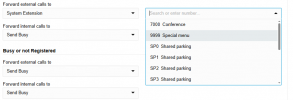
If I select System Extension in a user’s Call Forwarding options, then the dropdown menu only shows extensions 7000 (Conference) – 9000 (Special menu) and SP1 – SP10 (Shared parking). The DRs and RGs do not appear.
I have already tried resetting the 3CX configuration and restoring a current backup, but that did not help. Updating to the current version 20.0 Update 8 (Build 1109 Release) and deleting all DRs and RGs (leaving only the Live Chat GRPs) also did not resolve the issue.
I have already tried resetting the 3CX configuration and restoring a current backup, but that did not help. Updating to the current version 20.0 Update 8 (Build 1109 Release) and deleting all DRs and RGs (leaving only the Live Chat GRPs) also did not resolve the issue.