MMS Integration

Status
Not open for further replies.

pbomboy

Free User
Joined
Aug 17, 2021
Messages
64
Reaction score
7
I purchased services from Telnyn, and SMS works great, but MMS does not work. Images sent to 3Cx Chat are not being received on the MMS Number. How ever I can sent attachments from 3cx web client to the external carrier MMS and they are received. Telnyx reports this is a 3Cx issue, and confirmed the content of the picture sent.
V18
 
Hi @pbomboy,

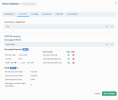
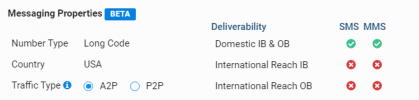
If you log into your Telnyx portal, under routing does your Deliverability show that MMS is enabled?

unnamed.png
 
Hi @pbomboy,

If you navigate to your Management Console >> Messaging >> MMS: You'll see the link to copy that should look something like: https://messaging.3cx.com/v3/webhook/XXXX-XXXX-XXXX-XXXX/etc.

After updating you should see link displaying /v3/webhook/... Copy that link and log into your Telnyx account, check that it is not v1, it should be v3.
 
Last edited:
  • Like
Reactions: Evolute IT
Hi @pbomboy,

Where are you trying to send from? (which 3CX Application?)
 
I believe this may be due to file size. The original picture is 3MB. I can send a small jpeg 202KB
Hi @pbomboy,

Where are you trying to send from? (which 3CX Application?)
Android V 16.7.8.121
 
Hi @pbomboy,

Are you able to send MMSes from any other 3CX application?
 
I downloaded the image from android photo gallery to a windows pc, and attached it through the web client, that worked.
I can also see all the photos that were sent via android are present in the Web client. Must be a bug with android. I will try IOS later.
 
Last edited:
I can also see all the photos that were sent via android are present in the Web client. Must be a bug with android. I will try IOS later.
Interestingly enough. If I open the web client on the android device and take a picture, it will not send. I have also tried to attach a stored camera image .jpg is also does not sent from the web client on android.
 
  • Like
Reactions: VoIPTools
Interestingly enough. If I open the web client on the android device and take a picture, it will not send. I have also tried to attach a stored camera image .jpg is also does not sent from the web client on android.
IOS same issue
 
Hi @pbomboy,

Are the MMSs you're sending under 300kb in size?
 
  • Like
Reactions: Evolute IT
I just resized a photo down to 600K, and it went through.
Via android - No. Using the web client I am able to send a 2.5MB file.
 
Great, glad that we've managed to discover what the problem was @pbomboy.

Note that we're considering adding a feature to prompt you to automatically resize the images prior to sending. It will most certainly appear in the change logs / blog.
 
When I get a single picture file to go through it sends the message with 2 pictures
 
Is that from both the Web Client and the Android App?
 
Status
Not open for further replies.

Forum statistics

Threads
112,065
Messages
590,589
Members
165,019
Latest member
rsaldin@advancedbrainspin