Mobile user number causing invalid caller id error on sip provider (Twilio)

Status
Not open for further replies.

Pratt

Customer
Joined
Dec 24, 2018
Messages
14
Reaction score
0
The only place i have a mobile number is in the user profile
That number is causing errors on the SIP provider as invalid caller ids

What is that mobile number used for?
Is there a way to keep that caller id from being used outbound?
 
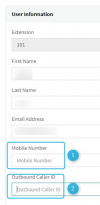
To first clarify, are talking about the "Mobile Number"(1) field in the extension/user settings? Is the "Outbound Caller ID" (2) populated with anything too?

1635775674941.png


If only the "Mobile Number" field is populated, go into the "Forwarding Rules" tab of this extension and select the Available Profile status. Scroll down a bit and you'll see a checkbox that reads "Ring my mobile simultaneously", is that selected?

Note: Check the "Lunch/Custom 1" Profile Status as well.
 
i have their mobile number populated and also the outbound caller id. The outbound caller ID is set to the sip trunk number.
 
Have you checked the "Ring My mobile simultaneously" option at all? How have you determined that it is the mobile number causing the issue, are you sure it is not the format in which the SIP Trunk number has been entered in the Outbound Caller ID field?

If you could explain the exact scenario in which the issue is occurring and mention any errors that popup it would help with narrow this down.
 
yes, I do have "ring my mobile simultaneously" checked
The SIP error on the trunk is:

SIP: 'From' phone number not verified: The caller-ID +(users mobile) is unverified. SIP Trunking terminating calls to PSTN must use a valid Caller ID in the From Field. A Valid Caller ID is either a DID you have purchased from Twilio or a verified Caller ID.
 
Is this happening for a specific user and specific call flow only? Could you let us know what the call scenario is and an example?

Based on the message, it would seem that the PBX is sending the mobile number of the user outward. That said, the mobile number value is not used as the caller ID so you may have to go through your PBX's settings to confirm that it is not set anywhere else too such as the Outbound Rules, Outbound Caller ID of an extension, Outbound Caller ID of the SIP Trunk or Outbound Parameters found in the SIP Trunk settings.
 
I have rechecked all of these.
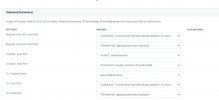
The only place I could see this pulling from is the outbound parameters perhaps?
would "called number" cause an issue?
1635779860721.png
 
There are many SIP parameters that can cause an issue but, based on the message you provided earlier, it would seem that for this case it is one of the "From" fields that is at fault.

You could check the Activity Log to review the SIP INVITE message sent to the provider to therefore determine which field exactly contains the mobile number if you want to be sure. Just make sure to enable Verbose Logging in "Dashboard >> Activity Log >> Settings" prior to replicating the issue and reviewing the log.

In the meantime, identifying which exact call scenarios are causing this issue is key so if there is a specific call flow that results in this do let us know. Is it, for instance only happening when a specific caller calls and then is forwarded out? Is it happening for all incoming calls that are forwarded outward again? Is it for every single outgoing call, or for specific users and their outgoing calls?
 
ok, I am able to reproduce. I checked the "ring my mobile simultaneously"

As soon as i did this and placed a call to my extension, the sip trunk gave this error:
SIP: 'From' phone number not verified: The caller-ID +(the phone number where the call ORIGINATED) is unverified. SIP Trunking terminating calls to PSTN must use a valid Caller ID in the From Field. A Valid Caller ID is either a DID you have purchased from Twilio or a verified Caller ID.

Why would the phone number calling inbound need verification?
 
the SIP invite looks like this:
sip:+(the mobile number)@company.pstn.twilio.com:5060

looks like the invite is coming from the MOBILE number, which should not be the case
 
The moment you enable the option "ring my mobile simultaneously" and a call hits your extension, the PBX will also initiate an outbound call to the mobile number and the caller ID will be the caller ID that called your extension.

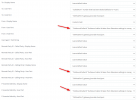
Go to your trunks outbound parameters and change the following 3 fields to "OutboundCallerId" as shown in the screenshot and press the OK button to save your settings. Then try again.

1635839003486.png
 
ok, this works now!
However, the mobile phone gets the caller id of the trunk, not the originating caller
And it has a strange caller id "John"
 
However, the mobile phone gets the caller id of the trunk, not the originating caller
And it has a strange caller id "John"
Did you set a caller ID in the extension settings, their DID number? If there is a valid caller ID there, then I would expect that to be sent, otherwise the trunk caller ID will be seen. Going by the message from your provider, I suspect that the originators caller ID cannot be sent, as your provider will not permit it.

A Valid Caller ID is either a DID you have purchased from Twilio or a verified Caller ID.
Probably need a clarification of "verified".
 
Last edited:
ok, this works now!
Glad to see that worked. That means that the originators caller ID was the issue.

However, the mobile phone gets the caller id of the trunk, not the originating caller
And it has a strange caller id "John"
Since sending the originators caller ID was causing the issue then the trunks caller ID will have to stay for now.

I suspect the Twilio might have changed something recently that caused this since our previous tests showed that sending of the Originators caller ID was supported. We will run a few tests to verify and come back to you.
 
Just completed a series of tests with out Twilio test trunks and forwarding and presenting the Originators caller ID works just fine and the calls go through correctly. I also looked in our Elastix SIP trunk settings and I did not see any settings for controlling this so it should work.
With that in mind I would recommend checking your settings again and if you are still facing issues contact Twilio and ask why this is not working.
 
Status
Not open for further replies.

Forum statistics

Threads
111,994
Messages
590,183
Members
164,934
Latest member
bunthoeun.may