Moo law and Live Chat

Status
Not open for further replies.

RoryW

Customer
Joined
Oct 20, 2020
Messages
5
Reaction score
0
i Cant find where to set offline hours for live chat - help !
 
Hi Rory,

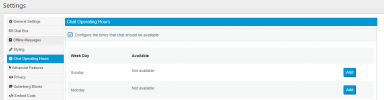
You can set chat hours from within the Live Chat settings.

Note that there must be an entry for each day when checking the box to Configure the times.

1619422885368.png
 
Hi Rory,

You can set chat hours from within the Live Chat settings.

Note that there must be an entry for each day when checking the box to Configure the times.

View attachment 21768

Hi VasilisV

I cant see that Settings box, where is it located.

Thanks

Rory
 
Hi @RoryW,

Are you using the Live Chat application with your server selected as 3CX or Standalone?

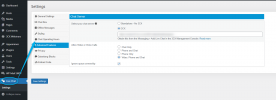
In Wordpress, once the Live Chat plugin is installed, it will present its own menu on the left hand side.

If I've misunderstood anything, feel free to clear this up with more detail and screenshots if you'd like.

1619436113050.png
 
Hi @RoryW,

Are you using the Live Chat application with your server selected as 3CX or Standalone?

In Wordpress, once the Live Chat plugin is installed, it will present its own menu on the left hand side.

If I've misunderstood anything, feel free to clear this up with more detail and screenshots if you'd like.

View attachment 21776

Hi, using 3cx. Installing on Joomla not Wordpress
 
Hi, using 3cx. Installing on Joomla not Wordpress

Also how do I change the time out as it times out very quickly is no answer
 
Hi @RoryW,

Hi, using 3cx. Installing on Joomla not Wordpress
The Customizable chat hours within Live Chat requires it to be installed on Wordpress. If you've installed it on Joomla, logging your agents out of the Live Chat queue in 3CX will create an offline message being displayed when a user opens the chat, if you've customized it to.

As for your question about time out, how long does it take to time out? Do you see the chat in your 3CX Webclient?
 
"logging your agents out of the Live Chat queue in 3CX" - where is this done ?

chat in 3CX - in messaging on left if that is what you mean ?
 
Hi @RoryW,

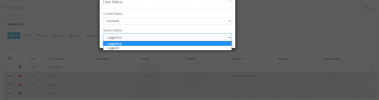
Logging in to an extension that has manager rights of a group, you can log agents in or out of the queue from the Extensions tab, selecting the extensions you'd like to log out then clicking Status.

1619438320038.png

chat in 3CX - in messaging on left if that is what you mean ?
You will see the chat appear in the web client of the extensions which you've added to the Live Chat queue / extension which you've chosen as the Live Chat recipient.

Here is a guide regarding Live Chat. At the bottom is a Joomla specific guide.
 
Status
Not open for further replies.

Forum statistics

Threads
112,149
Messages
590,965
Members
165,170
Latest member
SupportRock