MS Teams Integration questions

TSSEngineers

Customer
Advanced Certified
Joined
May 10, 2024
Messages
16
Reaction score
0
Hi All,

Was wondering if we could get some assistance/advice. We have deployed 3cx at one of our sites, and they want to look at the Teams integration. We have followed the guide below:
https://www.3cx.com/docs/microsoft-teams-v18/
The certificate is in place and when i ping teams.sigma-broking.com, it comes back with the Public IP Address of the 3cx. The user we are trying to test with is correctly synced, on the 3cx it shows 365+teams and i can see the number+extension on the Teams user.
But for some reason in the Teams Direct Routing the connection is showing as down. Port 5062 has been opened.
Please let me know any suggestions you may have.

Kind Regards,
TSS
 
Have you completed the integration and run both the dial plan and map user scripts?

If so exit the teams app and te open it, under the calls section do you see a dial pad, and if so try making a call.
 
Hi Charles,

Yes we ran both the Dial plan and the user script and it didn't show any errors at the time.

Kind Regards,
TSS
 
Please exit the team's app and re-open it. Under the calls section, do you see a dial pad? If so, try making a call.
 
Hi Charles,

We have tried that, we just get 'please try again later' when trying to make a call. Nothing is seen on the 3cx call log.

Kind Regards,
TSS
 
I've restarted the services for 3cx and checked the activity log, noticed this:
10/05/2024 19:08:04 - Created transport for Teams SBC: 0.0.0.0:5062/TLS fk=0 tgt=

Kind Regards,
TSS
 
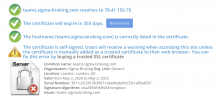
Tell me something: Is the certificate you uploaded for teams integration a wildcard certificate or a full certificate under the same FQDN as the FQDN for the 3cx system?
 
Hi Charles,

I will double check with our Team that provided the certificate, but as far as i am aware its a full certificate:
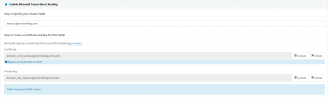
Certificate.PNG
Kind Regards,
TSS
 
Our FQDN for the Sigma system is sigma.3cx.uk.

Kind Regards,
TSS
 
Thanks guys,

We got a different party to do the certificate side of things so wasn't aware it was self signed. What Microsoft Trusted CA is usually the most reliable/cheapest?

Kind Regards,
TSS
 
We use GlobalSign as our root, works well for us. So any provider that uses them as a root will work.
 
We have managed to sort the certificates and managed to make inbound/outbound calls. Only problem is, is there anyway for calls to go out as 07472etc rather than 447472etc, anytime i try with a 0 it strips the 0 so it just goes as 7472 and fails.

Kind Regards,
TSS
 
Try Disabling the E164 processing options. This is also mentioned in the guide from my previous reply.
 
Thanks for all your assistance so far.

Is there a way to Sync Existing 3cx Users with their Teams/365 Profile, or will it always create a new 3cx profile with a new extension?

Kind Regards,
TSS
 
Thanks for all your assistance so far.

Is there a way to Sync Existing 3cx Users with their Teams/365 Profile, or will it always create a new 3cx profile with a new extension?

Kind Regards,
TSS
Regarding your question, 365 integration, user sync, will sync with an existing 3CX user provided that the email address entered in the 3CX user's extension matches that of their M365 email address.
 
  • Like
Reactions: Evolute IT
Is 3CX 8SC Ent license sufficient for Microsoft Teams integration with 3CX or is it mandatory to have 16SC?
 

Members Online Now

No members online now.

Forum statistics

Threads
111,831
Messages
589,277
Members
164,660
Latest member
RJenkinsROCK