Ultimately you can do whatever you want. 3CX is just an application so as long as the network is probably configured/routed, 3CX can work in any number of configurations. But as far as official configurations please refer to this page:
https://www.3cx.com/blog/docs/network-configurations-supported-3cx-phone-system/
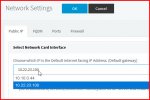
Ever seen any issues when there are two virtual NICs in 3CX like this?
He has:
1. DMZ NIC: 10.22.23.100
2. LAN NIC: 10.10.0.44
See attached screen cap.
The sys admin that set this up for me is no longer with our company and I want to confirm that this is a functional configuration. I'm just about ready to do full inbound / outbound call tests - but want to get a sanity check prior to that effort.
Basically - he has it defaulting OUT the DMZ NIC 10.22.23.100 and all private address space routed back into the LAN NIC 10.10.0.44.
3CX-Prod:~# route -n
Kernel IP routing table
Destination Gateway Genmask Flags Metric Ref Use Iface
0.0.0.0 10.22.23.254 0.0.0.0 UG 0 0 0 ens224
10.0.0.0 10.10.1.254 255.0.0.0 UG 0 0 0 ens192
10.10.0.0 0.0.0.0 255.255.254.0 U 0 0 0 ens192
10.22.23.0 0.0.0.0 255.255.255.0 U 0 0 0 ens224
172.16.0.0 10.10.1.254 255.240.0.0 UG 0 0 0 ens192
192.168.0.0 10.10.1.254 255.255.0.0 UG 0 0 0 ens192
We then use a static 1 to 1 NAT rule in our firewall to a public IP. No SIP ALG crap. We restrict inbound SIP TCP/UDP 5060 to ONLY our telephony providers source IP ranges and then allow RTP from ANY source IP.
Basic calls are working - but I have to do more testing like conference, transfer, forwarding, & CFD app - to make sure this is a functional configuration.