


- Joined
- May 31, 2018
- Messages
- 103
- Reaction score
- 22
I had to change the interface on my 3CX installation. It maintains the same IP address and everything seems to be working fine, except PnP multicasting. The route is not in the group for the interface under the join list.
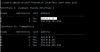
Short of a reinstall of the 3CX server client, how can I fix this? I can work around this by manually going to the phone, setting the SIP PnP address directly to the server IP, and then rebooting the phone. This however is a big pain when trying to do multiple phones. As seen below, I need it listed under interface 25, not just interface 1. I'm certain this is why phones aren't appearing.
Thanks in advance.
Short of a reinstall of the 3CX server client, how can I fix this? I can work around this by manually going to the phone, setting the SIP PnP address directly to the server IP, and then rebooting the phone. This however is a big pain when trying to do multiple phones. As seen below, I need it listed under interface 25, not just interface 1. I'm certain this is why phones aren't appearing.
Thanks in advance.


