Multiple Contacts in "SearchContacts" Scenario

Status
Not open for further replies.

dplx11

Bronze Partner
Basic Certified
Joined
Jul 26, 2023
Messages
3
Reaction score
0
Hey,

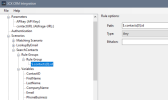
I query contacts through free text search (Contacts/CRM) using my own template. Getting a single contact works, but even if there are multiple contacts trasmitted, the Webclient only shows one contact. I have already packed the contacts into a JSON array like here - but in that way the request to the server ends in a timeout. What does a JSON for multiple contacts have to look like? Unfortunately the reference doesn't provide much information on this. Should I use an array-description way like in the screenshot (it neither works, maybe I am doing it wrong)

Thanks in advance, Dennis
1724434106414.png


JSON:
{
 "contacts": [  {
    "id": 42513,
    "firstname": "Marlies",
    "lastname": "Test",
    "title": "",
    "company": "55W 42513",
    "email": "",
    "businessphone": "+496XXXXXXXX",
    "businessphone2": "+.",
    "mobilephone": "+.",
    "url": "https://crm.example.com/show?42513",
    "comment": ""
  },
  {
    "id": 42512,
    "firstname": "Martina",
    "lastname": "Test",
    "title": "",
    "company": "32M 42512",
    "email": "",
    "businessphone": "+496XXXXXXX",
    "businessphone2": "+.",
    "mobilephone": "+.",
    "url": "https://crm.example.com/show?42512",
    "comment": "Hallo"
  }]
}
 
Rule should be "contacts.id". Same goes for the variables too.

Not "$.contacts[0].id".
 
Thanks, I just changed that. But with the JSON mentioned in my first post there ist no contact displayed in the client. Is that JSON correct, or should the array be built in a different way?
 
Can you show the full XML of your template? There we can see much more than from the screenshot.
 
Of Course. The display of a single Contact works but if I send multiple contacts in a JSON-Array the "loading" animation of the WebClient runs on and on until the request times out - but my server sent a valid response. I just think I do not form the Array properly for the PBX.

XML:
<?xml version="1.0"?>
<Crm xmlns:xsi="http://www.w3.org/2001/XMLSchema-instance" xmlns:xsd="http://www.w3.org/2001/XMLSchema" Country="DE" Name="M42" Version="1" SupportsEmojis="true">
  <Number Prefix="Plus" MaxLength="[MaxLength]" />
  <Connection MaxConcurrentRequests="2" />
  <Parameters>
    <Parameter Name="APIkey" Type="Password" Parent="General Configuration" Editor="String" Title="API Key:" />
    <Parameter Name="contactURL" Type="String" Parent="General Configuration" Editor="String" Title="Abfrage-URL:" />
  </Parameters>
  <Authentication Type="Basic">
    <Value>[APIkey]:X</Value>
  </Authentication>
  <Scenarios>
    <Scenario Id="" Type="REST">
      <Request SkipIf="" Url="[contactURL]getContact" MessagePasses="0" Message="callee=[Number]" RequestContentType="application/ini" RequestEncoding="UrlEncoded" RequestType="Post" ResponseType="Json">
        <Headers>
          <Value Key="ApiKey" Passes="0" Type="String">[APIkey]</Value>
        </Headers>
      </Request>
      <Rules>
        <Rule Type="Any">contact.id</Rule>
      </Rules>
      <Variables>
        <Variable Name="ContactID" Path="contact.id">
          <Filter />
        </Variable>
        <Variable Name="FirstName" Path="contact.firstname">
          <Filter />
        </Variable>
        <Variable Name="LastName" Path="contact.lastname">
          <Filter />
        </Variable>
        <Variable Name="CompanyName" Path="contact.company">
          <Filter />
        </Variable>
        <Variable Name="Email" Path="contact.email">
          <Filter />
        </Variable>
        <Variable Name="PhoneBusiness" Path="contact.businessphone">
          <Filter />
        </Variable>
        <Variable Name="PhoneBusiness2" Path="contact.businessphone2">
          <Filter />
        </Variable>
        <Variable Name="PhoneMobile" Path="contact.mobilephone">
          <Filter />
        </Variable>
        <Variable Name="CustomValue" Path="contact.comment">
          <Filter />
        </Variable>
        <Variable Name="ContactUrl" Path="contact.url">
          <Filter />
        </Variable>
        <Variable Name="PhotoUrl" Path="contact.photo">
          <Filter />
        </Variable>
      </Variables>
      <Outputs Next="" AllowEmpty="true">
        <Output Type="ContactID" Passes="0" Value="[ContactID]" />
        <Output Type="FirstName" Passes="0" Value="[FirstName]" />
        <Output Type="LastName" Passes="0" Value="[LastName]" />
        <Output Type="CompanyName" Passes="0" Value="[CompanyName]" />
        <Output Type="Email" Passes="0" Value="[Email]" />
        <Output Type="PhoneBusiness" Passes="0" Value="[PhoneBusiness]" />
        <Output Type="PhoneBusiness2" Passes="0" Value="[PhoneBusiness2]" />
        <Output Type="PhoneMobile" Passes="0" Value="[PhoneMobile]" />
        <Output Type="CustomValue" Passes="0" Value="[CustomValue]" />
        <Output Type="ContactUrl" Passes="0" Value="[ContactUrl]" />
        <Output Type="EntityId" Passes="0" Value="[ContactID]" />
        <Output Type="EntityType" Passes="0" Value="Contacts" />
        <Output Type="PhotoUrl" Passes="0" Value="[PhotoUrl]" />
      </Outputs>
    </Scenario>
    <Scenario Id="LookupByEmail" Type="REST">
      <Request SkipIf="" Url="https://...com/getContact?mail=[Email]" MessagePasses="0" RequestEncoding="UrlEncoded" RequestType="Get" ResponseType="Json" />
      <Rules>
        <Rule Type="Any">contact.id</Rule>
      </Rules>
      <Variables>
        <Variable Name="ContactID" Path="contact.id">
          <Filter />
        </Variable>
        <Variable Name="FirstName" Path="contact.firstname">
          <Filter />
        </Variable>
        <Variable Name="LastName" Path="contact.lastname">
          <Filter />
        </Variable>
        <Variable Name="CompanyName" Path="contact.company">
          <Filter />
        </Variable>
        <Variable Name="Email" Path="contact.email">
          <Filter />
        </Variable>
        <Variable Name="PhoneBusiness" Path="contact.businessphone">
          <Filter />
        </Variable>
        <Variable Name="PhoneBusiness2" Path="contact.businessphone2">
          <Filter />
        </Variable>
        <Variable Name="PhoneMobile" Path="contact.mobilephone">
          <Filter />
        </Variable>
        <Variable Name="CustomValue" Path="contact.comment">
          <Filter />
        </Variable>
        <Variable Name="ContactUrl" Path="contact.url">
          <Filter />
        </Variable>
      </Variables>
      <Outputs AllowEmpty="false">
        <Output Type="ContactID" Passes="0" Value="[ContactID]" />
        <Output Type="FirstName" Passes="0" Value="[FirstName]" />
        <Output Type="LastName" Passes="0" Value="[LastName]" />
        <Output Type="CompanyName" Passes="0" Value="[CompanyName]" />
        <Output Type="Email" Passes="0" Value="[Email]" />
        <Output Type="PhoneBusiness" Passes="0" Value="[PhoneBusiness]" />
        <Output Type="PhoneBusiness2" Passes="0" Value="[PhoneBusiness2]" />
        <Output Type="PhoneMobile" Passes="0" Value="[PhoneMobile]" />
        <Output Type="CustomValue" Passes="0" Value="[CustomValue]" />
        <Output Type="ContactUrl" Passes="0" Value="[ContactUrl]" />
        <Output Type="EntityId" Passes="0" Value="[ContactID]" />
        <Output Type="EntityType" Passes="0" Value="Contacts" />
      </Outputs>
    </Scenario>
    <Scenario Id="SearchContacts" Type="REST" EntityId="SearchContacts">
      <Request SkipIf="" Url="[contactURL]searchContact" MessagePasses="0" Message="search=[EscapedSearchText]" RequestContentType="application/ini" RequestEncoding="UrlEncoded" RequestType="Post" ResponseType="Json">
        <PostValues>
          <Value Key="search" Passes="0" Type="String">[EscapedSearchText]</Value>
        </PostValues>
      </Request>
      <Rules>
        <Rule Type="Any">contacts.id</Rule>
      </Rules>
      <Variables>
        <Variable Name="ContactID" Path="contacts.id">
          <Filter />
        </Variable>
        <Variable Name="FirstName" Path="contacts.firstname">
          <Filter />
        </Variable>
        <Variable Name="LastName" Path="contacts.lastname">
          <Filter />
        </Variable>
        <Variable Name="CompanyName" Path="contacts.company">
          <Filter />
        </Variable>
        <Variable Name="Email" Path="contacts.email">
          <Filter />
        </Variable>
        <Variable Name="PhoneBusiness" Path="contacts.businessphone">
          <Filter />
        </Variable>
        <Variable Name="PhoneBusiness2" Path="contacts.businessphone2">
          <Filter />
        </Variable>
        <Variable Name="PhoneMobile" Path="contacts.mobilephone">
          <Filter />
        </Variable>
        <Variable Name="CustomValue" Path="contacts.comment">
          <Filter />
        </Variable>
        <Variable Name="ContactUrl" Path="contacts.url">
          <Filter />
        </Variable>
      </Variables>
      <Outputs Next="" AllowEmpty="true">
        <Output Type="ContactID" Passes="0" Value="[ContactID]" />
        <Output Type="FirstName" Passes="0" Value="[FirstName]" />
        <Output Type="LastName" Passes="0" Value="[LastName]" />
        <Output Type="CompanyName" Passes="0" Value="[CompanyName]" />
        <Output Type="Email" Passes="0" Value="[Email]" />
        <Output Type="PhoneBusiness" Passes="0" Value="[PhoneBusiness]" />
        <Output Type="PhoneBusiness2" Passes="0" Value="[PhoneBusiness2]" />
        <Output Type="PhoneMobile" Passes="0" Value="[PhoneMobile]" />
        <Output Type="CustomValue" Passes="0" Value="[CustomValue]" />
        <Output Type="ContactUrl" Passes="0" Value="[ContactUrl]" />
        <Output Type="EntityId" Passes="0" Value="[ContactID]" />
        <Output Type="EntityType" Passes="0" Value="Contacts" />
      </Outputs>
    </Scenario>
  </Scenarios>
</Crm>
 
Your rule specifies:
contact.id

But according the the sample JSON response you posted, it should be:
contacts.id
 
  • Like
Reactions: Evolute IT
Status
Not open for further replies.

Forum statistics

Threads
112,320
Messages
591,865
Members
165,463
Latest member
ICTSupport@bedfordgirlssc