Solved Multiple Outbound Caller ID

Status
Not open for further replies.

monroeatc

Bronze Partner
Joined
Nov 14, 2024
Messages
15
Reaction score
3
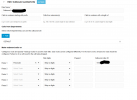
Looking for suggestions to configure two separate Outbound Caller ID's. Small client with 10 users, has been using 3CX for years. They acquired a smaller established office location, in a different area code, with only 1 user. They'd prefer to have Outbound caller ID display the caller ID of the corresponding location, since both have been established businesses in their respective areaa for years. Customer preference is to select a line, when making outbound calls. This way, they have the flexibility to mix/match employees between the two locations. Alternatively, I also thought we'd leverage departments, and assign the 1 solo user to the new location, but I've been unable to make that work.

Anyway, I read elsewhere on the forum that you could modify the provisioning template, but that it would nullify support. I'd prefer to find a natively supported solution, even if it put a little extra work on the customer. For example, assigning/reassigning departments to coincided with their location.
 

Attachments

  • Screenshot 2025-02-17 183845.png
    Screenshot 2025-02-17 183845.png
    44.4 KB · Views: 39
  • Screenshot 2025-02-17 183800.png
    Screenshot 2025-02-17 183800.png
    43.2 KB · Views: 37
Is the location , in the different areacode using a separate trunk?

In the outbound rules you can specify which route, outbound calls from certain extensions, will take. This means that the extension, in the other areacode can be forced to take a route that adds the correct caller ID. If there is only one user, at the other location, then the DID can be added to that extension so it will show on all outbound calls.
The alternative is to create rules that require a different prefix, to select the route (and therefor caller ID) as required.
 
  • Like
Reactions: monroeatc
No, the 2nd location is using the one/only existing trunk. I did think about assigning the DID from the 2nd location to this one user, and was sort of saving that as a last resort. We currently have the DID for the 2nd location assigned to a ring group, which includes the one user, and then falls back to the 1st location when unanswered.

Ultimately, the best way to handle this would be a 2nd trunk, right?
 
If you put the Caller ID number in the outbound route, does this work?

You would have to ensure that the number used is in the format that your provider requires it. If the Caller ID is in a format the provider does not like they do have the option to reject the call, mask it with their own number, or send it as Anonymous.

Your outbound rules look fine, just ensure the format. For example they might want it in E164.
 
  • Like
Reactions: monroeatc
I did think about assigning the DID from the 2nd location to this one user, and was sort of saving that as a last resort. We currently have the DID for the 2nd location assigned to a ring group, which includes the one user, and then falls back to the 1st location when unanswered.
These are two different things.

You can still assign the DID number to the one users extension, for outgoing calls so that it shows his number to the called party on every call. The incoming DID setup you described can remain as-is. It deals with the inbound routing, it can still send inbound calls to wherever you want.
 
  • Like
Reactions: monroeatc
Customer preference is to select a line, when making outbound calls. This way, they have the flexibility to mix/match employees between the two locations.
Create outbound rules like you have but instead of Departments being the criteria for selecting the outbound rule, make them with prefix.
So if someone dials 9[called_number] then the first outbound rule is selected. If they dial 7[called_number] then the second rule is selected. You can then strip the first digit so the number is dialed correctly.
This way users can select which caller ID to show when making calls.
 
  • Like
Reactions: monroeatc
Create outbound rules like you have but instead of Departments being the criteria for selecting the outbound rule, make them with prefix.
So if someone dials 9[called_number] then the first outbound rule is selected. If they dial 7[called_number] then the second rule is selected. You can then strip the first digit so the number is dialed correctly.
This way users can select which caller ID to show when making calls.
Ahh, yes. This worked exactly as I intended. We actually just created 1 rule, dialing 9 + 10-digit, and with the appropriate outbound caller ID for the 2nd location. All other calls default to the main location. I had to play with the order of the rules, because they have a couple for dialing local without the 1, etc. but it works perfectly. This gives them the ultimate flexibility as any user can no make outbound calls on behalf of the 2nd location, without any management of departments, etc. Thank you!
 
Status
Not open for further replies.

Forum statistics

Threads
111,974
Messages
590,081
Members
164,899
Latest member
mazet