Multiple Systems stuck routing to "Holiday"

Chris Neils

Silver Partner
Basic Certified
Joined
Sep 18, 2018
Messages
15
Reaction score
4
I have 2 systems that I know of right now that are stuck in routing to Holiday hours. Neither of the systems have holiday hours scheduled and nothing will take them out of this. I have used the Override office hours from the webclient and set it to "Default office hours" which did not work. I put it in Holiday and took it back out, which did not work. I change it to "In office" hours and set a duration, which did work but then as soon as the duration is over it changed right back to Holiday. Nothing has changed on these systems as far as programming, both were upgraded to v20 within that last few months though. They have both worked fine, until today. We have rebooted the entire system and that changed nothing. Changed office hours, changed DIDs to other ring groups, removed DIDs and added back. I have implemented Call Scripts for in/out office dial codes which will work for putting the office into hours but will not change it back to " default" its like the system is stuck in this holiday mode. It won't automatically change at all, even after break times end. Attached is the call log that shows its going to Holiday and a picture showing no Holidays are set.
In the call handling, I can change the option of what to do during holiday and that is working, so I can set it to ring anyway and then it will ring through, so I know its following my flow still, its just ignoring the actual office hours. System is updated to the latest version as well. This was happening on an earlier version and I updated it to see if that would fix it.

 

Attachments

  • Screenshot 2025-09-02 133254.png
    Screenshot 2025-09-02 133254.png
    78 KB · Views: 10
  • Screenshot 2025-09-02 133853.png
    Screenshot 2025-09-02 133853.png
    9.1 KB · Views: 10
They have only the default department?

Did they never have holidays set? The upgrade should copy the dates to the default department.

Have you tried creating a holiday, say yesterday or tomorrow at 5-6 am?
 
Yes only the default dept. Have never had holidays set up. I have not made a holiday yet but if the system is not auto switching from break times to in office then I don't see it switching from that either.
 
I was just thinking, to kick-start it.

What did you mean when you wrote, "I put it in Holiday and took it back out"?
 
I was just thinking, to kick-start it.

What did you mean when you wrote, "I put it in Holiday and took it back out"?
On the webclient under "Override office hours" there's an option to set it to holiday there. That's what I was referring to. Thinking maybe I could get it to actually leave holiday mode if it was stuck somehow.
 
We are having the same issue here, using the default department and have no holiday times configured. Calls are getting routed to holiday hours.

I did run an Alpha update but that didn't help.

One thing I noticed is the digital receptionist was stuck and wasn't able to make any changes to it. I delete it and readded it again, same issue.
 
Hello,

please try the following:

3CX - Admin - Integrations - Call Scripts -> "Add from Store"
Select the option file: resetdepartmentdefault.cs
Give it a name like "resetdepartmentdefault"
Enter a Dial Code (free internal number you would like to use), example: 9988, or 998
Click 'save', and go back.

Now dial internal the number of the script (example: 9988 or 998)
You should hear a voice "Phone System is now set to IN Office Hours."

Paulo
 
Paulo thank you so much, this worked for us!
 
Hi Paulo,

After the recommended change our system doesn't seem to be able to go to Holiday hours anymore. Is this an expected behavior?
 
@Alayyoubi ,

What exactly do you mean?
why should it go to holliday?

Paulo
 
We had setup our system with an Office Holiday yesterday as we were closed and the systems didn't route calls to our afterhours DR (Digital Receptionist). We have our Default department setup to send calls to the afterhours DR when on holiday, but it is not working this way.
 
@Alayyoubi ,

A sip trunk is set to an department or set to system wide.
If set to system wide, check where DID is going, for example queue and this queue is set to a department.
Once you know the depatment you are using from the trunk, check the department office hours and holliday set?

Not just any department or Default department, follow the Sip Trunk/DID to be exact on where the holliday is set.

After this you can go back to the place where the DID is connected (example queue), and check what is set there for the holliday routing.
Whatever you set there will be executed, like play message or transfer to Digital receptionist or voicemail.

Paulo
 
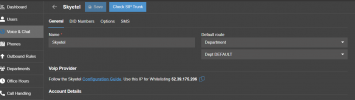
Sip Trunk set to a department

1762971030835.png

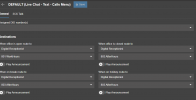
Department set to point to 801 WorkHours during work hours, and to 803 AfterHours when closed or on holiday.

1762974828745.png

Added today as a holiday to test but calls are still going to 801 WorkHours. Couldn't know why.

1762974903409.png
 
Hello,

Please check the Skyetel trunk, at the 'Options' tab, if trunk is limit to "System wide", or something else.

However, I can see you are using the "(Live Chat - Text - Call menu)".
I do not ever use this, not sure how this works, and if this works?

For me, I would set the Trunk to go to another Digital receptionist (example 808), and set all the options there.
But I do not use the chat and you do use it?

Normally I work with the GOLDEN rule.... where the call comes in the call handeling, is where the department is selected.
The selected department must have the holliday. The trunk can be limited to single department.
If the system is not doing what you expect, you are not in the department you think you are.

Paulo
 
Hi Paulo,

I did create a new department (OurCompany) and moved all extensions, DR and ring Groups to it and holiday hours seems to work. This must be a bug in the default 3CX department.

Thanks for all your help!

Ahmed Alayyoubi
 
  • Like
Reactions: paulodagraca

Forum statistics

Threads
111,954
Messages
589,921
Members
164,851
Latest member
DrunkeMeister