- Joined
- Aug 1, 2017
- Messages
- 29
- Reaction score
- 5
3CX Version: 16.0.655
Windows 10 Pro on local dedicated computer I5 with 8 GB Ram 256GB SSD
IP Phone Make/Model/Firmware (38) Yealink
Provisioning Method: Local
Trunk Provider:Nextiva
Gateway Make/Model: WatchGuard-XTM T50
Has the Firewall Checker passed: YES
Are custom Phone Templates being used: N/A
Since 8/15/2020 The SIP registration fails, then succeeds a few minutes later.
This has happened more than 100 times since 8/15/2020
From 1/1/2020 until 8/14/2020 we had 8 registration failures.
The latest update to 16.0.655 has not resolved the problem
Below are examples of the notifications I get
Date: Fri, 25 Sep 2020 01:09:31 -0400
Trunk L:10002(Nextiva) has changed status to unregistered. This means that no more calls will pass via this trunk. Please check your network connection and the voip provider or other SIP PBX
Date: Fri, 25 Sep 2020 01:09:33 -0400
Registration at Nextiva has failed.
Destination (sip:xxx.xxx.xxx.xxx:5060;lr) is not reachable, DNS error resolving FQDN, or service is not available.
Date: Fri, 25 Sep 2020 01:11:31 -0400
Trunk L:10002(Nextiva) has changed status to registered.
There does not appear to be a pattern in the time that it fails.
Here are some:
Trunk-L:10002(Nextiva)hasbeenchanged 9/23/2020 4:03PM
Trunk-L:10002(Nextiva)hasbeenchanged 9/23/2020 3:28PM
Trunk-L:10002(Nextiva)hasbeenchanged 9/23/2020 8:33PM
Trunk-L:10002(Nextiva)hasbeenchanged 9/23/2020 2:33AM
Trunk-L:10002(Nextiva)hasbeenchanged 9/21/2020 2:37AM
Trunk-L:10002(Nextiva)hasbeenchanged 9/20/2020 9:26AM
Trunk-L:10002(Nextiva)hasbeenchanged 9/19/2020 11:20PM
Trunk-L:10002(Nextiva)hasbeenchanged 9/18/2020 8:08PM
Trunk-L:10002(Nextiva)hasbeenchanged 9/18/2020 5:00AM
Trunk-L:10002(Nextiva)hasbeenchanged 9/18/2020 3:27AM
Trunk-L:10002(Nextiva)hasbeenchanged 9/17/2020 6:18PM *
Trunk-L:10002(Nextiva)hasbeenchanged 9/17/2020 2:12PM
Trunk-L:10002(Nextiva)hasbeenchanged 9/17/2020 5:34AM
Trunk-L:10002(Nextiva)hasbeenchanged 9/16/2020 10:29PM
Trunk-L:10002(Nextiva)hasbeenchanged 9/16/2020 3:24PM
Trunk-L:10002(Nextiva)hasbeenchanged 9/16/2020 11:50AM
Trunk-L:10002(Nextiva)hasbeenchanged 9/16/2020 5:16AM
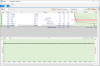
I installed a Progam called PingPlotter and there were no packet losses during the registration failure.
I eliminated a DNS resolution issue by placing a static IP in the Trunk details in place odf the FQDN.
I have contacted the SIP Provider and over the last 23 days we have been testing, changing and monitoring
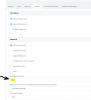
They had me change the Re-Registration timeout to 3600 from 60.
The SIP trunk was removed and replaced, and the Authentication ID was changed twice.
Policies were created in the WatchGuard Firewall to 1. to disable SIP-ALG, 2. allow Multicast.
The Trunk IP mode was set to IPV4
The transport protocol was set to UDP
IPV6 was disabled on the computer.
The SIP Provider Tech support said that they monitored the traffic from my IP and the 3CX is sending registration request every 30 seconds.
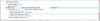
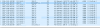
My packet captures look like it is every 25 seconds.
The SIP Provider says this is excessive and needs to be changed to a longer period of time.
How can I change this?
Windows 10 Pro on local dedicated computer I5 with 8 GB Ram 256GB SSD
IP Phone Make/Model/Firmware (38) Yealink
Provisioning Method: Local
Trunk Provider:Nextiva
Gateway Make/Model: WatchGuard-XTM T50
Has the Firewall Checker passed: YES
Are custom Phone Templates being used: N/A
Since 8/15/2020 The SIP registration fails, then succeeds a few minutes later.
This has happened more than 100 times since 8/15/2020
From 1/1/2020 until 8/14/2020 we had 8 registration failures.
The latest update to 16.0.655 has not resolved the problem
Below are examples of the notifications I get
Date: Fri, 25 Sep 2020 01:09:31 -0400
Trunk L:10002(Nextiva) has changed status to unregistered. This means that no more calls will pass via this trunk. Please check your network connection and the voip provider or other SIP PBX
Date: Fri, 25 Sep 2020 01:09:33 -0400
Registration at Nextiva has failed.
Destination (sip:xxx.xxx.xxx.xxx:5060;lr) is not reachable, DNS error resolving FQDN, or service is not available.
Date: Fri, 25 Sep 2020 01:11:31 -0400
Trunk L:10002(Nextiva) has changed status to registered.
There does not appear to be a pattern in the time that it fails.
Here are some:
Trunk-L:10002(Nextiva)hasbeenchanged 9/23/2020 4:03PM
Trunk-L:10002(Nextiva)hasbeenchanged 9/23/2020 3:28PM
Trunk-L:10002(Nextiva)hasbeenchanged 9/23/2020 8:33PM
Trunk-L:10002(Nextiva)hasbeenchanged 9/23/2020 2:33AM
Trunk-L:10002(Nextiva)hasbeenchanged 9/21/2020 2:37AM
Trunk-L:10002(Nextiva)hasbeenchanged 9/20/2020 9:26AM
Trunk-L:10002(Nextiva)hasbeenchanged 9/19/2020 11:20PM
Trunk-L:10002(Nextiva)hasbeenchanged 9/18/2020 8:08PM
Trunk-L:10002(Nextiva)hasbeenchanged 9/18/2020 5:00AM
Trunk-L:10002(Nextiva)hasbeenchanged 9/18/2020 3:27AM
Trunk-L:10002(Nextiva)hasbeenchanged 9/17/2020 6:18PM *
Trunk-L:10002(Nextiva)hasbeenchanged 9/17/2020 2:12PM
Trunk-L:10002(Nextiva)hasbeenchanged 9/17/2020 5:34AM
Trunk-L:10002(Nextiva)hasbeenchanged 9/16/2020 10:29PM
Trunk-L:10002(Nextiva)hasbeenchanged 9/16/2020 3:24PM
Trunk-L:10002(Nextiva)hasbeenchanged 9/16/2020 11:50AM
Trunk-L:10002(Nextiva)hasbeenchanged 9/16/2020 5:16AM
I installed a Progam called PingPlotter and there were no packet losses during the registration failure.
I eliminated a DNS resolution issue by placing a static IP in the Trunk details in place odf the FQDN.
I have contacted the SIP Provider and over the last 23 days we have been testing, changing and monitoring
They had me change the Re-Registration timeout to 3600 from 60.
The SIP trunk was removed and replaced, and the Authentication ID was changed twice.
Policies were created in the WatchGuard Firewall to 1. to disable SIP-ALG, 2. allow Multicast.
The Trunk IP mode was set to IPV4
The transport protocol was set to UDP
IPV6 was disabled on the computer.
The SIP Provider Tech support said that they monitored the traffic from my IP and the 3CX is sending registration request every 30 seconds.
My packet captures look like it is every 25 seconds.
The SIP Provider says this is excessive and needs to be changed to a longer period of time.
How can I change this?