I sense your urgency for answers, but it's normal to experience some delays before getting responses as the forum is free and participation is voluntary.
If you don't have a 3CX Partner associated with your license who you could rely on for step-by-step (live) assistance, you might want to consider this option. This is particularly important if you represent the prestigious Hilton hotel, where a system outage could lead to significant revenue loss due to the inability to receive telephone reservations.
If you are located in Montreal, we would be pleased to offer our assistance.
We are based in Granby and can travel to you. There is also
@ConceptsWeb based in Saint-Jérôme.
If I were in your position, I would consider switching to Linux. While it might seem a bit daunting, it is essentially the same 3CX system with the same interface, but running on Debian OS which eliminates potential conflicts caused by Windows, especially Windows 10. Additionally, if you need to manipulate files (which is not recommended by 3CX), you can access the 3CX files using an SFTP client like Filezilla, WinSCP, or FlashFXP—there are numerous software options that support SFTP, providing an "explorer" like access to your files.
Whether you choose to stay on Windows or switch to Linux, the procedure remains the same.
Step #1 is to ensure you have an extension with the "owner" role in the system, that its login password works, and that all user emails are unique because the "super admin" user (admin) in your system will no longer exist in V20.
You absolutely need an extension.
VERY IMPORTANT ---> [Upgrade checklist and FAQ]
Next, perform a complete backup of your 3CX PBX and move the backup out of the 3CX folder, preferably downloading it to your local computer (not the server). Then, shut down the 3CX VM. Ideally, create a new VM with the 3CX ISO on Debian, follow the installation steps, and restore your backup at the designated step.
If you insist on staying with Windows, instead of shutting down your 3CX PBX, uninstall the 3CX software. Perform all Windows updates and their dependencies. Reinstall 3CX v20 and restore your 3CX backup during the designated step in the setup.
To download the latest version of 3CX, go to your client portal:
https://customer.3cx.com/
Log in, navigate to the 'Download' tab, and download the desired version.
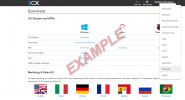
* Your client interface might differ from mine as a partner.
If you take my advice and choose Linux, here is the installation procedure that will allow you to set up a new configuration or restore a backup:
https://www.3cx.com/docs/manual/installing-debian-linux-pbx/
Otherwise, the procedure for Windows is available here:
https://www.3cx.com/docs/manual/phone-system-installation-windows/