New 3CX Windows Desktop App

Status
Not open for further replies.

Ivanb10

Gold Partner
Basic Certified
Joined
Jul 13, 2021
Messages
43
Reaction score
4
I am having trouble provisioning an extension on the new 3cx windows desktop app. When going to the web client I install the application from there. But when I click provision, the application does not automatically provision. I have tried to uninstall and reinstall but same issue. Can anyone help me out here?
 
Hi @Ivanb10,

Two tests here:
  1. If you log in as a different extension on that PC, can you provision it via the Desktop App? If no,
  2. On a different PC, are you able to provision your original extension via the Desktop App?
 
One more thing, make sure the Desktop App completely exited, check the notification area of Windows, right click on the Desktop App icon and press Exit.

Then, from the WebClient, try to provision again. What happens?
  • The Desktop App window appears but it does not provision?
    OR
  • The Desktop App does not appear at all?

Also, if you are running any AntiVirus software, uninstall it temporarily, reboot your PC and try again.
 
@NickD_3CX
After closing 3cx, clicking provision will not open the application.

@VasilisV_3CX
I tried another extension but could not provision it either. I am assuming she would be able to on another computer but I cannot test and she is off today.

I also tried it on another browser but still cannot. Checked windows updates and computer is up to date.
 
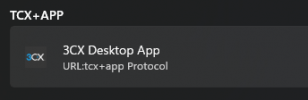
In Windows Settings > Apps > Default Apps > Default Apps by Link/Protocol, make sure this is set to 3CX Desktop App:

1637345454850.png
 
On a different PC, are you able to provision your original extension via the Desktop App?
Did you try this? Just to narrow things down and see if it is something specific to this PC.
 
@VasilisV_3CX @NickD_3CX
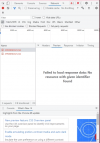
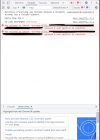
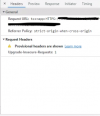
I have some photos here from what I am getting from DevTools. I just opened DevTools and clicked Provision. Not really sure what they mean and I have looked it up but I could not find much of anything. Hope this can help.
 

Attachments

  • Screen Shot 2021-11-19 at 1.05.55 PM.png
    Screen Shot 2021-11-19 at 1.05.55 PM.png
    159.4 KB · Views: 10
  • Screen Shot 2021-11-19 at 1.06.16 PM.png
    Screen Shot 2021-11-19 at 1.06.16 PM.png
    168.7 KB · Views: 10
  • Screen Shot 2021-11-19 at 1.07.12 PM.png
    Screen Shot 2021-11-19 at 1.07.12 PM.png
    44.2 KB · Views: 10
Last edited:
Hi @Ivanb10,

This looks like a permissions issue, can you try from a different browser? If you've downloaded Firefox in the past, may I suggest downloading Firefox portable and trying from there?
 
Okay it was able to provision using Firefox. I had tried edge but that one did not work. Not really sure why it had worked on Firefox but not chrome or edge.
 
Status
Not open for further replies.

Forum statistics

Threads
112,349
Messages
592,027
Members
165,513
Latest member
megalmazan