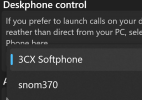
New 3CX Windows Softphone BETA with Deskphone Control

ThomB_3CX

Staff member
Joined
Apr 28, 2022
Messages
839
Reaction score
1,291

Control your deskphone from your softphone.​

If you like answering calls on a physical phone - rather than from your softphone - this BETA allows you to do just that. You can also access an all-new, quick action panel for faster logging in/out of queues and more.

Use as a Softphone or with a Deskphone​

Initia...
Continue reading the Original Blog Post.
 
Last edited by a moderator:
Yeah Mr. B!
Awesome news :D Both deskphone control and the msi thing for customers using remote desktop services were highly awaited.
We're very happy to have it now as it were showstoppers for many migrations.
And thank you for the forecast on the missing features (1-3) that helps us planning.
 
Last edited:
:D:D:D:D
Great news 3CX!
 
Adding the features you are doing on this version and more importantly the upcoming chat feature has now made this app acceptable to our clients feature wise ..... thanks for the update !
 
  • Like
Reactions: CallingFromMars
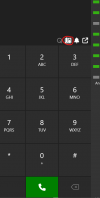
Is it planned to add a dropdown menue to to the new "device picker button" to switch between devices? This would be more user friendly. The other three buttons are clickable, too, and not just displaying a status.
1716300903392.png
 
Last edited:
I think, we found a bug in the beta release. If you pick a deskphone and paste a phone number in, it automatically establishes the call by 50% chance. It seems to happen more often if it starts with + (not sure about that).
Tested with yealink T46
 
Did somebody tried to use TAPI together with a deskphone?
 
@CallingFromMars we cannot seem to replicate this issue.
1. Where do you copy the number from? CRM etc. Does it perhaps have some special characters attached to the clipboard?
2. Are you using Jabra Headset integration when in this mode?
3. Can you replicate the issue anyhow when select 3CX Softphone?
 
tapi working? this would be interesting...
 
Hello!
We have a company that uses tapi and deskphones. The problem is you can only make one call out of their program. When you try a second call nothing happens anymore. When i open the Microsoft dialer i cannot make a call because a other program has an open connection. It looks like that the hangup does not reach the dialer.

Maybe someone else also had this problem!
 
@Marcus-Ideefix yes this is a known issue and will be fixed with the upcoming release
 
  • Like
Reactions: jprousseaux
@CallingFromMars we cannot seem to replicate this issue.
1. Where do you copy the number from? CRM etc. Does it perhaps have some special characters attached to the clipboard?
2. Are you using Jabra Headset integration when in this mode?
3. Can you replicate the issue anyhow when select 3CX Softphone?
Yeah, I can reproduce this behaviour. Tested it again today from the home office.
Setup: Beta Client, first release with the ability to control your deskphone. I´m using a Yealink SIP-T46. When I paste the number my deskphone dials out without even pressing enter or doing anything.
1. The first time I noticed this was when I copy & pasted a number from my browser into the dialer. Then re-tested to copy the number from in a Windows RUN Window and then from notepad. I copied no speacial characters. It doesn´t matter from where I paste it in. It seems to happen more often when the number starts with +49 or 49 in my tests.
2. It only happens when you control a deskphone, so I think headset integration plays no role here. I have a premium jabra headset connected to my deskphone. But yes, I have Jabra Headset integration enabled, because I use it in home office.
3. No, it does not happen when you select 3CX Softphone as call device, only for the deskphone control mode.

If you want the support can come through and we can show it in quick remote session, if you cannot replicate this.
 
Last edited:
Is the headset integration working in this version? (Yealink WH62 and WH66)
 
@jbrilliant we are waiting for an updated library from Yealink to proceed
 
Hotkey for Copy and Paste into Dialer?!. I just can find "Open Dialer"
 
@nicojmb2 we are still waiting from Yealink to provide us with the necessary library.
 
@OpIT GmbH this is not available in the softphone due to MS policies not allowing for such functionality.
Our recommendation here is to use click2call for web.
 
looks nice, Users where have an Iphone App i got the three options DESK (SNOM..) 3SX Softphone and Smartphone. With the users where having the App on an Android Phones there is NO smartphone . Bug ? or Settings
 

Attachments

  • 3cx.png
    3cx.png
    75.4 KB · Views: 5

Forum statistics

Threads
112,131
Messages
590,899
Members
165,137
Latest member
Steve0792