New beta as of yesterday 16.5.0.46: regression

Status
Not open for further replies.

nobody

Bronze Partner
Joined
Aug 15, 2017
Messages
500
Reaction score
57
the problem that when the phone is locked that it only rings but I cannot answer the call is back.
also: opening the "recordings" will crash the application.
 
Last edited:
Hi @nobody, We cannot reproduce the ringing with inability to answer issue, but we are already looking into the issue with Recordings.
Please confirm your device info, and version info for Android OS, PBX and host OS.
 
Device is Xperia XZ1 compact, OS is Sony branded OS9. 47.2.A.11.228.
Happens every time, I also restarted the phone.
If the phone is locked, and the app is closed, it will ring, and the screen will stay dark, if I unlock the phone, even if I open the app there is no dialog to answer the call. Ringing continues until timeout.
If the phone is locked, and the app is still in memory, the display will be lit an I can answer the call.
If the phone is unlocked, and the app is closed, the "white" answer dialog comes up, and I can answer
Does that help?
Should I try to send you a logfile?
 
I Forgot: pbx version: 16.0.655 running on Server 2016.
 
Can you please check the app's permission and notification settings and report back? Long-tap the 3CX app icon and go into "App info" to check. If all permissions and notification settings are on and the issue persists, you can send us a device log to assist us in tracing the issue.
 
app has permissions: camera, contacfts, microphone, storage, Telephone
Also: background data of mobile network is enabled
Not enabled: "unrestricted data usage when data saver is on"
Is not default phone app
 
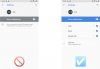
I could reproduce the behavior you are reporting if the "Show notifications" was disabled for the 3CX app - see screenshot on the left. If "Show notifications" was enabled, the app rings and works as expected - see screenshot on the right.
Please ensure that the "Show notifications" setting is enabled for the app and re-check.
 

Attachments

  • no_ringing_on_sony_xperia_forum_issue-v1a.jpg
    no_ringing_on_sony_xperia_forum_issue-v1a.jpg
    32 KB · Views: 5
All notifications are already set to on (the previous beta did not have this problem, no settings were changed during the upgrade).
 
@nobody
We made right now a regression test with 16.4.4.132 and 16.4.4.131 - they all has the same behavior (of which we were aware). The app cannot enable or disable notification settings, it's controlled via device settings and enabled/disabled by the user.

Me personally I encountered this issue some time ago on a Huawei device, where they said explicitly:
"Scenario 4: No banner notification is displayed when a new message is received. Banners has been disabled for Messaging. Open Settings, search for and access Apps, locate Messaging, touch Notifications management, and enable Banners."
https://consumer.huawei.com/uk/support/content/en-gb00407070/

So it might be similar with your device. Please let us know.
Thanks.
 
Also, depending on the device and OS, there might be a special "Silent" mode that disables these notifications silently and for specific time period, e.g. night-mode operation. You can check this by turning off the system's "Silent" and/or "Do Not Disturb" modes before retrying.
 
Sorry, but this does not change anything, also neither silent mode or DND is on.
I have an identical spare phone. I will reinitialize it to factory defaults and try again with this one.
 
@nobody that's a good test plan. Please share your results and logs if the issue persists with the new device.
The recordings issue has been addressed and to be included in an upcoming release.
 
Ok, the outcomings are yes, and no:
Yes because is works initially when setting up the program on the blank Phone. But no, because as soon as I enable the telekom api the problem is like described before.
With the previous beta, it also works fine with telecom api enabled.

But worse, if telekom api is not enabled: Yes, I am able to answer the call, but then the screen stays black until the call is hung up. I cannt login to the phone until the call is finished.
 
Please use the "Send Log Report" option in "Settings" > "Advanced" and include your info and device model in the details.

Also, clarify if you are you using some accessory to perform call operations, i.e. a wired or wireless headset.
 
ok.
I sent three reports, but the last one is a duplicate of the second.
 
Today I tried to answer a call using the headset in the case when the phone rings but no dialog is shown. The headset repeatedly asked me if I want to answer the call, and I tried several times to answer but was not sucessful.
Dont know if that helps finding the problem, but I wanted to report it anyway.
 
We have a new beta out that you can try out. Also, make sure that you have enabled the 'Car/Bluetooth support (Telecom API)' option in 'Settings' > 'Advanced'. Let us know if the new version addresses your issue.
 
Thank you.
I use the version since Saturday and up to now it looks like the problems have been gone. But I wait a few more days to be sure it really works.
Loading recordings seems also working now.
 
  • Like
Reactions: KyriakosP
Missed three calls today because the phone did not rang, But later it worked again.
 
@nobody please enable the 'Verbose Logging' in 'Settings' > 'Advanced' and send the logs to trace either via the app or to android [at] 3cx.com. Also, if you can you provide us with some info on the situation and when this happens, e.g. mobile or WiFi network connection, any connected accessories like a bluetooth headset.
 
Status
Not open for further replies.

Forum statistics

Threads
112,149
Messages
590,965
Members
165,171
Latest member
Mahlon