New install, can't access USERS or VOICE & CHAT

np_user

Customer
Joined
Oct 27, 2025
Messages
5
Reaction score
3
We just did self hosted on AWS. I am set as the system owner, only user, licence holder etc.

When I log in and click ADMIN at the bottom I see the secondary navi. eg Dashboard, USers, Voice & CHat, Phones etc

Users mydomain.com/#/office/users - redirects to https://mydomain.com/#/people
Voice & Chat https://mydomain.com/#/office/voice-and-chat - redirects to https://mydomain.com/#/people

I can go to SYSTEM -> Email and change the SMTP server however

Any assistance would be appreciated. We are trying to work out whether to use this 3CX or not
 
Hi,

Can you open the dashboard? Is the firewall check Green? Can you access the Activity log and set to debug to see if there is some specific error shown?
 
Yes we can open the dashboard,

Firewall is green

Version 20.0 Update 7 (Build 1060 Release)

I can click on ADMIN

In ADMIN, I can do:
Dashboard, System, Advanced, Integrations, Backup, Recordings, EVent Log, Reports, Office Hours, PHones

Can't do:
Call Handling,Departments, Outbound Rules, Voice & Chat, Users

Firewall check was RED. I have run it successfully now green. No change in behaviour of systemm.


Activity Log

DateMessage
27/10/2025 17:27:28.180STUN discovery of public IP is disabled
27/10/2025 17:27:28.068There's no valid Domain certificate/key for SIP domain mydomain.com
27/10/2025 17:27:27.582[SL][EC100009]: External application is connected: application:ip-172-31-35-42:5485/DBServer local:127.0.0.1:38654 remote:127.0.0.1:5485
 
OK, so missing certificate alert would definitely be an issue - are you accessing via URL normally without errors or going in via IP?

You would need to provide a full certificate chain in .pem format, not just the server certificate part.
 
I have also send you a Direct Message.
 
Thanks I appreciate your help

Access is via the https://mydomain.com and logging in fine with no errors in Chrome.
 
Hi,

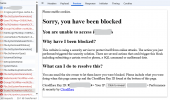
It looks like you are running Cloudflare in front of your PBX instance, which is blocking some of the HTTP calls the Admin panel is making to the PBX in order to render certain pages. You will need to either exclude the PBX from the cloudflare service or change how it filters by perhaps whitelisting your administration IPs:

1761552537393.png
 
Thanks I’ll have it updated by our team and try again
 
  • Like
Reactions: KyriacosS_3CX
Thanks we changed our cloudflare on that subdomain to be DNS only instead of proxied. It works a treat.

Impressive and quick response thank you!
 

Forum statistics

Threads
111,954
Messages
589,923
Members
164,852
Latest member
priya