New v20 install on premise VPS

albadream

Customer
Basic Certified
Joined
Apr 28, 2023
Messages
15
Reaction score
1
Dear all

Today I setup 3CX on a LINUX VPS (Debian 12) and in the 3CX panel (My Systems section) I followed the procedure to activate a 2 months trial licence.

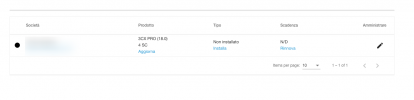
What I see is that it says its a 3CX v18 , while I have installed v20 on my VPS.

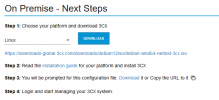
When I upload the config file or paste the config URL i get the message:
Invalid option selected


Please let me know what could be the issue.
Best regards.
 
screenshot? Did you generate a config to take the URL from?
 
Hello Alphabetic

Yes on my panel i can download the XML config file or copy the link.

But as you can see in the Product says version 18.00

And I have installed version 20 on my VPS

3CX-Portal.png
 
Assuming you pressed Install and got to this page?

1725277506871.png
 
  • Like
Reactions: Evolute IT
To be clear did you install using the 3CX ISO? If not, do that.

“Not installed” presumably means your server hasn’t activated the license key yet so the 3CX portal is not updated.
 
To be clear did you install using the 3CX ISO? If not, do that.

“Not installed” presumably means your server hasn’t activated the license key yet so the 3CX portal is not updated.
Yes the issue is about the activation
The downloaded file needed for activation does not work
 
I really don't know why 3CX has made all this mess with version 20 for installations etc, was not enough to use a licence key during install?!?
 
Did you installed by the ISO from 3cx or not? This sounds like you didnt.
 
yes sure i installed from official ISO
 
is there anyone who can give me a help?
 
Firstly you should confirm your license key is valid as there is no expiry date - if you had activated a trial I would expect to see an expiry date. Secondly, make sure all the details for the license are configured correctly. If you want to PM me your details I can register you for a trial and give you another key.

1725364983977.png
 
Firstly you should confirm your license key is valid as there is no expiry date - if you had activated a trial I would expect to see an expiry date. Secondly, make sure all the details for the license are configured correctly. If you want to PM me your details I can register you for a trial and give you another key.

View attachment 43597
It's just not activated.
 
We got the exact same issue with trial licenses, yes it's a thing.
 
-
 
  • Like
Reactions: bitn2
And did you manage to solve?
I am not able to install the test license on a v20 ISO downloaded directly from the homepage.

I have also restarted the VM three times, currently no solution, but also no real error description... it just doesn't load the config and it doesn't continue.
 
I've had no problem getting this set up, so something must be up.. What configure are you using? Browser? Special characters?

Can you send me a URL so I can review?
 
I am not able to install the test license on a v20 ISO downloaded directly from the homepage.

I have also restarted the VM three times, currently no solution, but also no real error description... it just doesn't load the config and it doesn't continue.
Shame on 3cx for issues like this....from a free PBX to a locked PBX.
 
  • Haha
Reactions: bitn2
Shame on 3cx for issues like this....from a free PBX to a locked PBX.
The issue is more that you don't give us enough information to help you. It's nothing easier than installing an 3cx.