New Windows Desktop app v18 - Hold greyed out

Status
Not open for further replies.

CC-VantageNetworks

Bronze Partner
Joined
Aug 23, 2021
Messages
3
Reaction score
1
I've installed the new 'desktop app' which is the web client installed via Electron, all looks pretty good, but when it is in deskphone mode (with Yealink T46S) the Hold and Keypad options are greyed out. Also, when transferring (either direct or attended), the call isn't automatically placed on hold.

Is this by design or an issue?
 
but when it is in deskphone mode (with Yealink T46S) the Hold and Keypad options are greyed out.
These options will be disabled by design when in deskphone mode due to limited functionality in this mode so what you're experiencing is expected.

Also, when transferring (either direct or attended), the call isn't automatically placed on hold.
What does the person being transferred hear? Is it just silent?

Could you also provide the following info:

• Exact version of 3CX PBX (check in Dashboard >> Information >> License).
• Involved devices firmware version.
• Are you using custom templates?
• Where is the 3CX PBX, On-Prem, Hosting Provider or Hosted by 3CX?
• How are the involved devices provisioned, Local, 3CX SBC or Direct SIP(STUN)
 
  • Like
Reactions: Evolute IT
Hi Chris, thanks for the reply!
These options will be disabled by design when in deskphone mode due to limited functionality in this mode so what you're experiencing is expected.
This is a bit of a problem for us and our clients and may stop the move to the new desktop app as currently with the 'old' desktop app this functionality works.
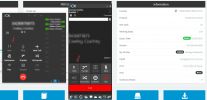
Yes you can use the physical hold button on the phone but then that slightly defeats the purpose of using the app. Screenshot below of the apps side-by-side on the same call showing the different functionality. On the left the Hold button is greyed out, on the right it is available for use.
2021-08-24 07_27_21-3CX Phone System Management Console and 9 more pages - Work - Microsoft​ E...png
What does the person being transferred hear? Is it just silent?

Could you also provide the following info:

• Exact version of 3CX PBX (check in Dashboard >> Information >> License).
• Involved devices firmware version.
• Are you using custom templates?
• Where is the 3CX PBX, On-Prem, Hosting Provider or Hosted by 3CX?
• How are the involved devices provisioned, Local, 3CX SBC or Direct SIP(STUN)
Sorry slight miscommunication; I should have said there is no hold music after pressing transfer until the actual transfer is initiated. So you can press Transfer or Att. transfer and the user will still be talking to the original caller until a transfer destination is selected THEN the hold music starts.
This coupled with the inability to put someone on hold via the app is very inconvenient for the users.
  • 3CX PBX version is 18.0.1880
  • Yealink firmware 66.86.0.5 T46S and 28.83.0.130 T46G
  • No custom templates in use
  • 3CX is hosted in AWS with SBC on-prem
  • Phones are provision via 3CX SBC
 
  • Like
Reactions: ms38
This is a bit of a problem for us and our clients and may stop the move to the new desktop app as currently with the 'old' desktop app this functionality works.
This is due to the fact that the 3CX Windows App and the new 3CX Desktop App do not use the same methods when in deskphone mode. You can still use the 3CX Windows App though as it still is a supported 3CX App.

I should have said there is no hold music after pressing transfer until the actual transfer is initiated. So you can press Transfer or Att. transfer and the user will still be talking to the original caller until a transfer destination is selected THEN the hold music starts.
I see, in that case that is actually expected behavior. It may very well differ from when using the IP Phone directly as most IP Phones will automatically place a call on hold once the transfer button is pressed.
 
This is due to the fact that the 3CX Windows App and the new 3CX Desktop App do not use the same methods when in deskphone mode. You can still use the 3CX Windows App though as it still is a supported 3CX App.


I see, in that case that is actually expected behavior. It may very well differ from when using the IP Phone directly as most IP Phones will automatically place a call on hold once the transfer button is pressed.
I see, that's rather disappointing. Are there any plans to retire the 3CX Windows App and replace it with the new 3CX Desktop App? I can see our clients not accepting that behavior :(
 
Status
Not open for further replies.

Forum statistics

Threads
112,349
Messages
592,027
Members
165,513
Latest member
megalmazan