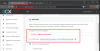
No agents available

Status
Not open for further replies.

Eder Pardeiro

Forum User
Joined
Jul 8, 2017
Messages
40
Reaction score
2
Hi,

I trying set up Live Chat & Talk using this tutorial: (https://www.3cx.com/blog/releases/website-live-chat-talk/), but unfortunatly don't work. When I try type start a chat in browser, appear the message bellow:
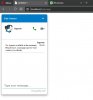
10093

See bellow how I set up:

HTML:
<html>
<head>
<meta content="text/html; charset=utf-8" http-equiv="Content-Type" />
<title>Untitled 1</title>
<script type="text/jscript" src="callus.js"></script>
<style>
#callus{
--call-us-form-header-background: #007bc7; //Primary Color
--call-us-header-text-color: #ffffff; //Secondary Color
position: fixed;
bottom: 20px;
right: 6px;
}</style>
</head>
<body>
<call-us id="callus"
phonesystem-url="https://conectiva.my3cx.com.br:5001"
party="marketing"
minimized="false"
allow-call="true"
allow-video="true"
operator-name="Suporte"
window-title="Fale Conosco"
authentication="name"
invite-message="Olá! Como podemos ajudá-lo?"
authentication="true">
</call-us>
</body>
</html>

10096


Initially I think his problem with my extension, but using this link can work normally: https://conectiva.my3cx.com.br/callus/#marketing

Anyone can help me with this issue?
 
Hi,

I trying set up Live Chat & Talk using this tutorial: (https://www.3cx.com/blog/releases/website-live-chat-talk/), but unfortunatly don't work. When I try type start a chat in browser, appear the message bellow:
View attachment 10093

See bellow how I set up:

<html>

<head>
<meta content="text/html; charset=utf-8" http-equiv="Content-Type" />
<title>Untitled 1</title>

<script type="text/jscript" src="callus.js"></script>
<style>
#callus{
--call-us-form-header-background: #007bc7; //Primary Color
--call-us-header-text-color: #ffffff; //Secondary Color

position: fixed;

bottom: 20px;

right: 6px;

}</style>
</head>

<body>

<call-us id="callus"
phonesystem-url="https://conectiva.my3cx.com.br:5001"
party="marketing"
minimized="false"
allow-call="true"
allow-video="true"
operator-name="Suporte"
window-title="Fale Conosco"
authentication="name"
invite-message="Olá! Como podemos ajudá-lo?"
authentication="true">
</call-us>
</body>

</html>
View attachment 10096


Initially I think his problem with my extension, but using this link can work normally: https://conectiva.my3cx.com.br/callus/#marketing

Anyone can help me with this issue?
Hello @Eder Pardeiro

Can you please check your browser for any console errors (F12). If you do have errors in the console with CORS, make sure that in your management console, you have the exact URL of the site, as the one that you show in the screenshot above.

Thank you.
 
  • Like
Reactions: Eder Pardeiro
Hey, looks like you are not using Port 5001! Just remove ":5001" in your html

Oh, and it looks like your test html is not from a puplic domain? You have to enter the domain from where the plugin tries to connect under the Settings->Wordpress->....
 
Hello @Eder Pardeiro

Can you please check your browser for any console errors (F12). If you do have errors in the console with CORS, make sure that in your management console, you have the exact URL of the site, as the one that you show in the screenshot above.

Thank you.
Hi, thank's for your answer.
None erros found in code.
 
Hey, looks like you are not using Port 5001! Just remove ":5001" in your html

Oh, and it looks like your test html is not from a puplic domain? You have to enter the domain from where the plugin tries to connect under the Settings->Wordpress->....

Hi, thank's for you answer.

I remove a port, and set-up a address in Wordpress session. Now It's work perfectly.

I think that how not use Wordpress, it would not be necessary to fill this field.
I don't use Wordpress. This site is a simple HTML.

Now it's work!!!
Thank you very much
 
Status
Not open for further replies.

Forum statistics

Threads
112,147
Messages
590,959
Members
165,167
Latest member
Finatra.us