


- Joined
- Apr 17, 2020
- Messages
- 3
- Reaction score
- 0
Hello,
we want to upgrade to the new Desktop App to use "mithören" Feature (we are running 3cx V18 Update 3 Build 461 8SC Enterprise Server on a self hosted debian). However, we can't get Audio (Speaker and Mic) to work with the new app or the webclient. With the old Windows App everything works as expected.
The Firewall-Check succeeds:
Not working: DesktopApp 18.8.508 - Echo Test via *777 not working, Calling own Mailbox not working, but we can hear the dialtone, ringing and ringtone
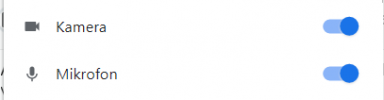
Not working: Webclient - Echo Test via *777 not working, Calling own Mailbox not working, but we can hear the dialtone, ringing and ringtone. Camera and Mic are allowed:
Working: Windows-App 16.3.0.264 - everything is working as expected (same clients).
Working: Hardware Phones (Auerswald)
Working: ios App on LAN and WAN
This is the config of the windows app:
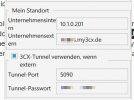
We tried to deactivate " 3CX-Tunnel für externe Verbindungen verwenden (nur 3CX-App)" and to activate "PBX überträgt Audio" for the user (it is already activated for the trunk) - but that brought no change. On another windows client the behaviour is the same (only tried on these both; no client firewall is used, AV is Windows defender, LAN Firewall allows outgoing traffic).
We run a Session Border Controller in the LAN but even uninstalling it made no changes at all.
What I'm I missing to get the DesktopApp working? Thanks a lot for your help!
we want to upgrade to the new Desktop App to use "mithören" Feature (we are running 3cx V18 Update 3 Build 461 8SC Enterprise Server on a self hosted debian). However, we can't get Audio (Speaker and Mic) to work with the new app or the webclient. With the old Windows App everything works as expected.
The Firewall-Check succeeds:
Code:
resolving 'stun-eu.3cx.com'... done
resolving 'stun2.3cx.com'... done
resolving 'stun3.3cx.com'... done
resolving 'sip-alg-detector.3cx.com'... done
testing 3CX PhoneSystem 01 SIP Server... done
stopping service... done
detecting SIP ALG... not detected
testing port 5060... done
starting service... done
testing 3CX PhoneSystem Media Server... done
stopping service... done
testing port 5090... done
testing ports [9000..9398]... done
Not working: DesktopApp 18.8.508 - Echo Test via *777 not working, Calling own Mailbox not working, but we can hear the dialtone, ringing and ringtone
Not working: Webclient - Echo Test via *777 not working, Calling own Mailbox not working, but we can hear the dialtone, ringing and ringtone. Camera and Mic are allowed:
Working: Windows-App 16.3.0.264 - everything is working as expected (same clients).
Working: Hardware Phones (Auerswald)
Working: ios App on LAN and WAN
This is the config of the windows app:
We tried to deactivate " 3CX-Tunnel für externe Verbindungen verwenden (nur 3CX-App)" and to activate "PBX überträgt Audio" for the user (it is already activated for the trunk) - but that brought no change. On another windows client the behaviour is the same (only tried on these both; no client firewall is used, AV is Windows defender, LAN Firewall allows outgoing traffic).
We run a Session Border Controller in the LAN but even uninstalling it made no changes at all.
What I'm I missing to get the DesktopApp working? Thanks a lot for your help!
Last edited:


