Solved No audio & no incoming calls (3CX + Yealink)

Status
Not open for further replies.

filip.ck

New User
Joined
Apr 6, 2021
Messages
9
Reaction score
2
Hi Everyone,

I would need your help with an issue which has appeared in the last 2 weeks. Maybe someone has experienced the same issue since I am unable to tell where could be the problem.

We are a retail company with 50 different locations in DACH and we are hosting our 3CX server in Google Cloud. Since 2 weeks on a few of our IP phones (Yealink W60B and W52P) have suddenly stopped working audio (both ways) and after re-provisioning of the devices, it is not possible to reach those numbers at all - "The person you have called is temporarily unavailable". (from internal and external numbers). Phones are successfully registered, have available status in 3CX, and are able to make outgoing calls (but still without audio).

Before the problems appeared we haven't changed anything (only the 3CX server was probably updated - it is done automatically), but now we made sure that all systems/devices are up to date (IP Phones, network devices). Also, all the ports are open and enabled on the network in the stores.

As soon as I enable the extension in the same store on Mac OS softclient, everything works like a charm.

3CX Version: Professional Annual 16.0.9
Server: Debian 9 (Google Cloud)
Provisioning: STUN
Firewall Check: All OK
SIP Provider: VirtualCall DE & CH
Locations: DE and CH (Different ISPs)

Attached is the log when I tried to reach the number - maybe you will see there something I cannot see. (In the log I was calling from a number ending 243, store number is ending 049)

Thank you for your help!

Filip
 
Hi Filip,

Based on the message "The person you have called is temporarily unavailable" (which sounds like it is coming from the provider, not 3CX) and on the logs, it seems the problem happens when you call the DID.

Have you tried calling the actual extension number of those phones? (ie.Extension 210, not the DID 49xxxxx )
 
If I call internally the Extension, there is our system automatic message that the store employees are busy and it will be forwarded to our Customer Solutions team.

I was sure it is the SIP provider, but they are claiming there is everything fine on their side. What could be the truth since if I set up the number on Mac OS softclient it works. Or?
 
Firstly lets see if we can reach the internal extension.

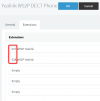
Did you call an extension that is provisioned on the DECT device directly?
1617789744737.png

Or did you perhaps call a ring group/queue/IVR/CFD extension?
 
I did call the extension directly:

If I call internally the Extension (210), there is our system automatic message that the store employees are busy and it will be forwarded to our Customer Solutions team.

But in both cases (calling the number from outside or extension 210 internally) I see the same thing in the Log (see attached)
 

Attachments

  • 3CX 2.png
    3CX 2.png
    61 KB · Views: 15
Last edited:
Ok since the outgoing calls work on the DECT phones, but incoming don't, you should take into consideration that they are setup as STUN phones.

No incoming calls might indicate that the device is not reachable (one way communication) when the PBX wants to send it a call.

An important side note: you should also consider deploying a 3CX SBC when using remote phones, as it tends to solve a lot of STUN related issues and removes the need to fulfil the above requirements.
 
Last edited by a moderator:
So I checked and tested everything again from the link you provided and we are 100% covered here.

All the ports are open
Firewall 100% OK
Extensions and phones are configured as per manuals
Every store has only 1 phone (so SIP and RTP ports are unique per location)

IP phones have fixed IP
All ports are forwarded to the phone's IP
SIP ALG is disabled

It is really so strange because everything was working well and suddenly we have the same problem in 4 different locations.
 
I did call the extension directly:

If I call internally the Extension (210), there is our system automatic message that the store employees are busy and it will be forwarded to our Customer Solutions team.

But in both cases (calling the number from outside or extension 210 internally) I see the same thing in the Log (see attached)
Ok that's great so far. Let's also check the above reply.

- Regarding the message that the employees are busy, how did you configure it?
- Under what conditions does that message play?
- Under what conditions do you forward a call to the Customer Solutions team?
 
This message comes after the extension does not answer for 20 seconds (standard forwarding rule within the extension) It goes to IVR and then to the CS queue

Edit: But in this case, it does not even ring, it goes to that IVR after 20 seconds of silence
 
Last edited:
Ok, so to try and start putting the pieces to together. The symptoms you are having are:
  • Incoming calls to these DECT STUN Extension (internal and external) to do ring the devices
  • Calling outbound from these DECT STUN devices, the call to ring the dialed number but once answered there is no sound.

Please try a few things to try and narrow things down:
  • From the DECT Extension, try calling *777. This is the Echo Extension. When you speak into the handset you should hear your voice. Does this work?
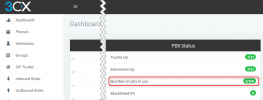
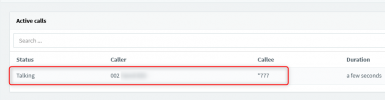
  • While you have a call to *777 active, go to the Management Console --> Dashboard and click on "Number of calls in use". Do you see the call there?
    1617802162466.png
    1617802169708.png
  • In the Management Console --> Phones, do you see the DECT STUN devices with the correct Public IP listed?
 
So we did the test and we could hear the Echo and also the call appeared in the Active calls on the Server.

And yes, there is the correct public IP address of the store next to the phone
 
That's a good sign, now lets see if we can go further with direct extension-to-extension calls:


1. Log into the webclient from a new test extension, do the *777 test to verify it works.

2. Now call the webclient from one of the DECT phones and see if you can have a 2-way conversation

3. Then do the reverse: call the DECT extension from the webclient and see if you can have a 2-way conversation.
 
Hi John,

We are able to make calls on 95% of our extensions without any issues. This problem is so far affecting only 4 locations.

First, there was a problem with the audio, then after the reset, it was not possible to reach them.
 
Hi Filip,

I would suggest to contact your 3CX Partner at this point, it appears your case requires more investigation now that we've gone over the basics.
 
I have posted it here to get an advise, or a hint to what do you think it could be based on the behavior I described above. If this looks like an issue on SIP provider side, 3CX server network/firewall, or store network/firewall.
 
Mostly on speculation I would suspect the firewall at the remote site most of all, due to this log:
1617868680063.png

But it's not very clear yet where the issue is exactly because you said you already checked the firewall. It might also be the ISP modem after the firewall that may be doing something you are not aware of, we've seen this happen on some cases where the modem blocks incoming SIP or blocks port 5060 or runs SIP ALG which can interfere.

If you cannot find anything though, I would strongly recommend you get a 3CX Partner on board to do an detailed investigation.
 
So I did reach out to our ISP (Vodafone DE) and after whole day of back and forth they've changed public IPs and their configurations in all affected stores and phones are working without any issues.

Thanks for your help guys!
 
Status
Not open for further replies.

Members Online Now

No members online now.

Forum statistics

Threads
111,831
Messages
589,277
Members
164,660
Latest member
RJenkinsROCK