No audio on external webclient and 3cx desktop app

Status
Not open for further replies.

fellwell5

Forum User
Joined
May 20, 2022
Messages
3
Reaction score
0
Dear community!

When we are using the webclient (https://<name>.3cx.at/webclient/#/) from an external device there is no audio connection.
I tried with different pcs & macs, from different locations (network providers) and with the webclient and 3cx desktop app.

Internal i have a 3cx desktop legacy working on a windows pc.

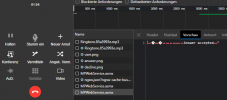
When i call in to the 3cx pbx from an mobile phone and accept the call with the webclient, i get the ringtone but no audio after accepting.
1689244117868.png

When i record the call, i only hear the voice from the mobile phone.

With the 3cx mobile app it is working from ios and android.
Audio and video for webconference is working.

Thank you for your very appreciated help!

Information about the PBX:
  • 3CX Version, Professional annual 18.0 (Build 312)
  • Server OS, offical Debian ISO
  • Is the 3CX Server Hosted and where? On-premises (VMWare)
  • IP Phone Make/Model/Firmware version, Webclient and 3CX Desktop App
  • Provisioning Method: webclient, desktop app provisioning via webclient
  • Trunk Provider or VoIP Gateway Make/Model, peoplefone Austria
  • Has the Firewall Checker passed: YES
  • Are custom Phone Templates being used: NO

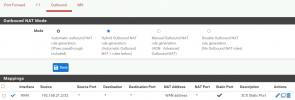
The firewall we are using is a pfsense.
The following NAT rules are set:

1689244420934.png
1689244458195.png
 
Can extensions call each other or is it is the same problem?

Normally this is a firewall issue with ports not forwarded but you say the checker passes... There's not a separate firewall rule blocking the RTP ports, maybe?
 
Does the audio work if you are not recording the call? Have you restricted the list of available Codecs, on some devices?
Have you looked over the 3CX Activity log (Verbose), for a clue, as to what might be happening?
 
Can extensions call each other or is it is the same problem?

Normally this is a firewall issue with ports not forwarded but you say the checker passes... There's not a separate firewall rule blocking the RTP ports, maybe?
Dear Steve!

I have the same problem when calling an internal extension with the webclient.
I have followed this manual to configure my pfsense firewall: https://www.3cx.com/docs/pfsense-firewall/
And the 3CX Firewall Checker shows all green & i am not aware of any other rtp blocking rules.


Does the audio work if you are not recording the call? Have you restricted the list of available Codecs, on some devices?
Have you looked over the 3CX Activity log (Verbose), for a clue, as to what might be happening?
Dear leejor!

Audio is not working in the webclient, if recording or not. I only tried to test with a recording enabled and heard the voice from the mobile phone but no voice from the webclient.
I don't have restricted the list. The codecs for my sip trunks are also on default.

I havent found any error in the activity log. Also i looked at a traffic pcap which also didn't helped me.
 
Hello @fellwell5 what I would suggest to check is the following:
  • Run the firewall checker on the pbx, this test must pass successfully
  • Check that you are not using any NAT Masquerade or IP Masquerading on the network where the pbx is installed.
  • Do not use any proxy https, deep packet inspection or antivirus scanning over the pbx/web client traffic.
Using the web client validate that the browser Chrome/Edge is updated and that you don't have any antivirus extension installed that could impact on the application. Check the audio settings are correctly configured on the application and allowed within the browser.

One last thing and very important, check that the Stun traffic is allowed to the PBX since it needs to receive these stun requests from the webclient, so it can start the DTLS connection and send the audio to the Web Client/ PWA.
 
Dear @Alejandro_3CX thank you for your reply! I will try your steps tomorrow, but one thing shocked me, because you wrote „Do not use any proxy https“.

I have a reverse proxy (caddy) infront of the 3cx webinterface. Can this be a problem?

Thank you in advance!

Best regards,
Matthias
 
@fellwell5 please try bypassing this proxy and perform the test, in the 3CX Academy we mention this (No Proxy HTTPS should be used).
 
Status
Not open for further replies.

Forum statistics

Threads
111,974
Messages
590,081
Members
164,899
Latest member
mazet