No audio PWA/Webclient, Mobile apps work

Chris Walters

Platinum Partner
Advanced Certified
Joined
Apr 6, 2017
Messages
105
Reaction score
43
Hello,

We recently migrated a system from on-prem to the cloud. After the migration, PWA/Webclient do not process audio. Calling *777 results in silence from PWA/WC. If you call *777 from mobile app, everything works.

This is happening at all of our locations that are trying to connect to the cloud server, at least 6 physical locations with different external IPs. Firewall check passes on the PBX side.

If you make an outbound call from the PBX to an external number and capture the traffic on the PBX, the external party audio reaches the 3CX server but the internal party audio does not.
 
I should add that it's the same operation with inbound and outbound. No audio on the PWA/WC but everything on the mobile apps work fine.
 
I just did an echo test with one extension working, one extension not.

On the working extension, we see in the invite <sip:EXT@PBXFQDN>
On the non-working extension, we see in the invite <sip:[email protected]>

Both extensions are on the same LAN using the same external IP.
 
Turns out the working extension is using the 3CX Softphone from the Microsoft Store. The PWA/WC do not work for any extension, but the 3CX Softphone and 3CX Mobile App ARE working for all extensions.
 
PWA Web client uses WebRTC, and the apps use tunnel. So on your deployment somehow WebRTC is being blocked, maybe a web application firewall or something. Or maybe audio is blocked at browser level using some client side anti virus or something.

This post could be relevant for you

Also maybe your splitDNS is not setup correctly and make sure your webclient is connecting via secure https
 
Last edited:
  • Like
Reactions: GregG_3CX
PWA Web client uses WebRTC, and the apps use tunnel. So on your deployment somehow WebRTC is being blocked, maybe a web application firewall or something. Or maybe audio is blocked at browser level using some client side anti virus or something.

This post could be relevant for you

Also maybe your splitDNS is not setup correctly and make sure your webclient is connecting via secure https
That makes sense on the WebRTC being blocked causing the issue, thanks for the clarification @N_G . I can connect to other systems with the PWA/Webclient and make calls fine from the same devices that fail with this server, so that leads me to believe it's something on the server side for this specific instance.

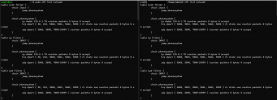
Is there a better command than 'nft list ruleset' for identifying the open ports in the nftables? The output from that command looks identical between the instance we're having trouble with and instances that work as intended. The only difference I see in these is the 80/443 vs 5000/5001 but that is to be expected based on the configuration of these 2 examples. The table on the right is from the instance with no audio over WebRTC.

1736263489907.png
 
In general its better to revert to the default port of 443 for https. Infact we no longer offer this install option out of the box but I know many older systems have it.

But at this point it is best to open a support case with logs if you don't mind....
 
In general its better to revert to the default port of 443 for https. Infact we no longer offer this install option out of the box but I know many older systems have it.

But at this point it is best to open a support case with logs if you don't mind....
I would love to open a support case on this one, however the only instance experiencing this is one of our NFR licenses, so I can't. :(

When the system was on-prem, it was using 5001. When I first migrated it back to the cloud, I changed the port to 443. Then when the audio issues started happening, I pulled some pcaps and saw traffic trying to still go to 5001, so I built a new VM and transitioned back to port 5001. With the system in the cloud, both 5001 and 443 have been tried, and we're getting WebRTC blocked with both.
 
The PBX uses ports 10499-10999 for WebRTC and as seen by your screenshot the OS firewall seems to be configured correctly so I'd recommend checking your hosting provider since they have a firewall of their own (security polices/rules etc).

Make sure it allows inbound traffic on this range for UDP.

I know you said the firewall checker passes but it starts checking this specific range from port 10600 and up so there is still a chance that for some reason you're not allowing 10499-10600.
 
  • Like
Reactions: GregG_3CX
The PBX uses ports 10499-10999 for WebRTC and as seen by your screenshot the OS firewall seems to be configured correctly so I'd recommend checking your hosting provider since they have a firewall of their own (security polices/rules etc).

Make sure it allows inbound traffic on this range for UDP.

I know you said the firewall checker passes but it starts checking this specific range from port 10600 and up so there is still a chance that for some reason you're not allowing 10499-10600.
Thanks for the response @ChrisC_3CX.

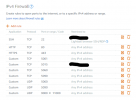
This is what the firewall configuration looks like in front of the PBX in the cloud. It matches the rest of our servers.

1736444062484.png
 
That actually looks correct. Might be worth checking if the WebRTC endpoints are reaching the PBX over ipv6 since I see the rules here apply for ipv4 only
 
Last edited:
That actually looks correct. Might be worth checking if the WebRTC endpoints are reaching the PBX over ipv6 since I see the rules here apply for ipv4 only
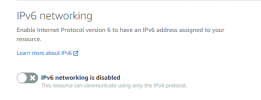
We actually have the IPV6 networking disabled on the cloud firewall:

1736538604429.png

We do not currently have IPv6 service active with our carrier. We have a /28 IPv4 block.

The one big thing to note here is that I can register to every other PBX I have out there and make calls with the webclient with good WebRTC audio. It's only this one server where we're not getting the audio through, and as you've seen the firewalls look accurate. I really wish I could open a support ticket on this to submit logs. :)