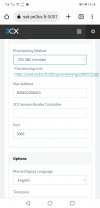
It's your network, so you should have an idea of what devices are on it. One of them seems to be telling you that an option is disabled. Whether this is the cause of the problems, I can't be certain.I just wanna know why its telling me
Sun discovery of public ip is disable
That is correct. If you have multiple STUN IP Phones at the same remote location behind the same Public IP, each one must have a unique SIP port and RTP Port range usually of at least 12 ports (some phones require more, check guides)1 For remote phone using sip stun i need to change the range rtp port for every one of the ip phones and port forward them to they private ip for rtp works ?
When switching Provisioning Method, it's best to Factory Reset the IP Phone to remove any residual settings that may stay behind.2 if i want to change the method of provisionnnig (for example remote SBC ) there is any port forward i have to do for the firewall in front of sbc ?
In the 3cx session border conTroller i need to put the public ip of the sbc ?When switching Provisioning Method, it's best to Factory Reset the IP Phone to remove any residual settings that may stay behind.
No, no port forwarding is requires though.
Okey i will try that then i will told, and rtp how it work in sbc ?The LAN IP of the SBC goes in that field.
But if you assign the IP Phone to an Extension from the "Phones" node in the Management Console after you factory reset it, it will fill this field in automatically, assuming of course that you have the SBC already setup on the LAN the phone is.
The phone sends all it's traffic to the SBC and the SBC sends to the server. All NAT issues is avoided as the SBC makes outbound connection to 3CX so upstream devices typically carry that state through and return traffic is delivered to the SBC.Okey i will try that then i will told, and rtp how it work in sbc ?
Founded in 2005, when VoIP was an emerging technology, 3CX has gone on to establish itself as a global leader in business communications.