Solved No inbound SMS on second or third number, first number working fine

Status
Not open for further replies.

ApolloVideo

New User
Joined
Mar 30, 2022
Messages
8
Reaction score
2
I'm having an issue with incoming SMS on my second and third number, Can send texts just fine from them. The first number I added for SMS works fine for both inbound and outbound.

I have confirmed that the DID's in Flowroute have the proper route and that messaging is enabled. In 3CX under SMS routes I have confirmed that the second and third number are entered in the proper format.

Under messaging stats in Flowroute I can see where they are receiving the texts and I can view what was sent, but I am not receiving any of them through the windows or iPhone apps, can only send texts.

Anyone have any ideas on what's wrong?

Thanks
-Peter
 
Hi Peter,

I would first suggest you check if the actual message is reaching the 3CX Server.

To do this, first enable Verbose Logging from the 3CX Management Console --> Dashboard --> Activity Log --> Settings.

Once you have done this, send an SMS from your mobile phone to one of the DIDs that you aren't receiving messages on with a specific message like "Good morning!".

Wait 1-2 minutes, then go to the Management Console --> Dashboard --> Activity Log --> Logs --> Instance and download the "3cxManagementConsole.log" file.
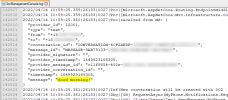
Open it with a text editor and search for the message you sent, and if it did arrive, you should see something like this:
1649923389108.png

Do you see something like this in your logs?
 
Last edited by a moderator:
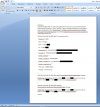
This is the response from the first number that works. I sent Good Morning from the other 2 numbers and I don't see them in 3cx. Started a ticket with Flowroute to see what they say.


2022 test.jpg
 
So far only response I've gotten was

Hi Peter,


One thing that I do want to ask is if you set a callback URL for those numbers individually via the API. If that's the case, you'll need to change that via the API to the webhook you have entered in the account. If that's not the case and you just need to clear out the account-wide URL, you can do that through the portal but removing the URL in the SMS and MMS fields in the dashboard (through API Control). You just remove the URL, then click update.


Thank you,
Paul

Just sent an email back stating I reset everything and still doesn't work.
 
If the messages for those 2 numbers are not arriving at 3CX you well in contacting Flowroute so they can check on their end where the messages are going.

They did ask you though if you for those specific DIDs, you ever set a webhook via their API in the past.
As far as I know, if you or someone else has, there isn't a lot they can do about it.
Have you ever used those DIDs before for SMS/MMS with some other service?
 
I personally have not. I just bought them last week and set up all 3 numbers at once. Also first time using their texting service.
 
So it was messed up on there end. All is good now. Thank you Nick for your help.

Hi Peter,


It looked like there was a different callback for the individual numbers compared what was set on the account. We removed those so it should be using the webhook that's in manage. Could you retest for us and let us know? Thanks!


Thank you,
Paul
 
  • Like
Reactions: NickD_3CX
Very glad to hear you got to the bottom of it Paul!

I'll go ahead and mark this thread as 'Solved'.
 
Status
Not open for further replies.

Forum statistics

Threads
112,065
Messages
590,584
Members
165,019
Latest member
rsaldin@advancedbrainspin