- Joined
- Jul 6, 2021
- Messages
- 7
- Reaction score
- 6
HI,
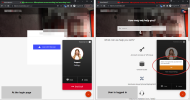
I've added the custom HTML to my Refined website, and it works well, I can make chats and phone calls from the support popup, the access to microphone is asked and working.
However, it's not working when a user is logged in on this website.
The 3CX "callus.js" javascript code still works. The button appears, chat or call options are present. The chat works flawlessly.
But trying to make a phone call then, immediately shows error "Allow microphone access from your browser".
There is no request for it (and of course the permission is already given on that website, and it's same URL, logged in or not)
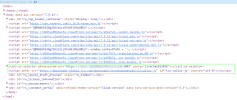
The custom HTML is still included obviously (or nothing would work), and I see no noticable difference in the page source and other javascript libraries being loaded, with and without login.
I realize this is difficult to troubleshoot. From 3CX point of view this would be a Refined bug or issue, since it's working correctly on the website when user is not logged in.
Refined support however points to 3CX to support this, because it's 3CX code that's not working.
So I really hope for advice from anyone , what could be causing this to fail when a user has logged in ?
See attached screenshots, Thanks for any useful insights !
I've added the custom HTML to my Refined website, and it works well, I can make chats and phone calls from the support popup, the access to microphone is asked and working.
However, it's not working when a user is logged in on this website.
The 3CX "callus.js" javascript code still works. The button appears, chat or call options are present. The chat works flawlessly.
But trying to make a phone call then, immediately shows error "Allow microphone access from your browser".
There is no request for it (and of course the permission is already given on that website, and it's same URL, logged in or not)
The custom HTML is still included obviously (or nothing would work), and I see no noticable difference in the page source and other javascript libraries being loaded, with and without login.
I realize this is difficult to troubleshoot. From 3CX point of view this would be a Refined bug or issue, since it's working correctly on the website when user is not logged in.
Refined support however points to 3CX to support this, because it's 3CX code that's not working.
So I really hope for advice from anyone , what could be causing this to fail when a user has logged in ?
See attached screenshots, Thanks for any useful insights !