no microphone on v16 client windows

Status
Not open for further replies.

fabiog

SOHO User
Joined
Jan 27, 2021
Messages
13
Reaction score
0
I try to use the V16 client but my micropohe is always off.
Microphone use is enabled in configuration and other apps as skype are working.
I can hear but not talk.
I use win10.
Any suggestion ?
 
Hi @fabiog,

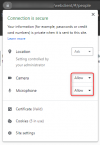
Which browser are you using? Did you enable microphone (allow) in your browser?

1632295179629.png
 
sorry I am using the windows APP not the web based.
why I need to enable microphone on web ?
1632299276564.png
 
Hi @fabiog,

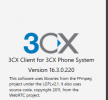
Ah my apologies, in that case you wouldn't need to. What is the exact version you're running? (check Settings >> Advanced >> About).

If you dial *777, do you hear yourself speak via the mic?

What type of microphone / headset are you using?

Does it work if you move to another PC?
 
if I dial *777 i do not hear.
Other collegues are using the software phone and in their pc it works
I use the standard headphone or notebook microprone/speakers, with skype,teams,zoom,meet all works.
1632300106244.png
 
Hi @fabiog,

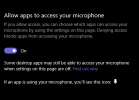
Are you running Windows 10? If so, click the search bar, type Settings then navigate to Privacy. Under App Permissions, select Microphone. Scroll down to the Allow desktop apps to access your Microphone, and ensure it is 'On'.

Have you select the microphone / speakers in the Audio settings in the Windows App, rather than leaving it default?
 
I try to use any setting in App.
aso use Of microphone is allowed.

1632309461347.png
1632309541429.png
 
Could you give the following a try and let me know what happens?

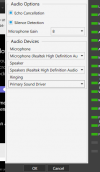
• Try disabling echo cancellation and Silence detection.

• Try different levels of "microphone Gain"

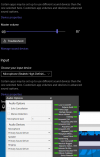
• In Windows Sound device settings, set the microphone as the default recording device and then have the 3CX Windows App use the "Primary Sound Driver" as the Microphone device.

• After you've made the changes, completely exit and re-launch the 3CX Windows App (Settings >> Exit Client) and then dial *777 to test again.
 
still no microphone
Skype, teams, zoom are working correctly

1632589872849.png
 
I use the standard headphone or notebook microprone/speakers,
You mention using the laptops standard mic and speakers, could you please test with a plug-in headset and test again?
 
I try mic it does not work.
I also try the verion 15.5.12227.5 other people use. It's the same no microphone is working. so it seems a bug that exist from Long time.
 
I try mic it does not work.
What do you mean exactly? Are you talking about a microphone on a headset, or a standalone mic, could you provide the device's make/model?

I also try the verion 15.5.12227.5 other people use. It's the same no microphone is working. so it seems a bug that exist from Long time.
Are you referring to the 3CX Windows App version? Regardless, the fact that it's v15 means it's a very old build and testing with it will not give us any reliable information. The way to go for troubleshooting this would be to only test with the latest stable versions. On that, could you let me know exactly what 3CX PBX and 3CX Windows App versions you're running?
 
If you read this thread, before writing, you see that I had version 16 before, I try to downgrade to check if it was a recently used bug, but with no suceess
Computer has realtek audio card ( its' a notebook) I also try Bluetooth headphones. All devices are working correctly with Skype, teams, and other conferencing system only 3cx is not able to connect with microphone.
 
If you read this thread, before writing, you see that I had version 16 before,
I know that you mentioned running v16 at the very beginning. I'm merely asking what version you are running now. If for instance you're still running v15 none of our tests will be valid. Also, you never mentioned what PBX version you are running.

In any case, since you've also tested other microphone devices with no luck I think this will need a more in depth look. That said, I'd recommend reaching out to one of our partners to have them help with this or even have them submit a 3CX Support ticket on your behalf so that our team can take a closer look at this.
 
Understand, I need to pay to have the system running, as today both my phone and computer are not working correctly with 3cx apps, so i need to ask company money to try to solve the problems.
I hope they will approve.
 
Status
Not open for further replies.

Forum statistics

Threads
112,349
Messages
592,027
Members
165,513
Latest member
megalmazan