Solved No more "MakeCall" since SP6 :-(

Status
Not open for further replies.

cwoller

Premier Customer
Joined
Aug 24, 2016
Messages
56
Reaction score
6
This maybe something you will have to raise with the manufacturer.

Taken from the post:

"Please note that only supported models for uaCSTA work with the webclient. Since DECT phones are not supported for CTI they cannot be used with the web client."

What phone make, model and firmware are you running also ? I would assume you are talking about snom but you have not quoted.
 
Nope. Please read the post again. This is _not_ about "direct" support for snom DECT phones. It doesn't matter if it's a snom DECT or other DECT, it is about a functionality that is missing since SP6.

See:

Before SP6 I had the option within 3CX Web to use "Make Call", which placed a "make call" on all my registered numbers. Therefore I could use any phone I'd liked - snom DECT worked this way since the beginning.

After SP6, make call isn't available from 3CX so it isn't a thing with snom DECT, it is a thing with upgrading 3CX to the latest possible level.

Again @3cx - PLEASE, please, please make "Make Call" working again from your 3CX Webclient.
 
Hello @cwoller

Please note that even though the method you are using is not supported nothing was changed in that regard. If push is enabled under an extension and it is the selected method of calling under the web client then the PBX will send a "Make Call" to the devices under the extension. Make sure that the push service for these extensions is still enabled.
 
  • Like
Reactions: cwoller
Hi YiannisH_3CX.

Where exactly can I find the push-service? The only thing that I can find is EXT > Phone Provisioning > 3CX Client > "Enable PUSH for smartphones". This is (and was) on.

I know (and accept) that using snom DECT isn't supported directly because for technical reasons. I only three things:

1) it worked before SP6
2) after SP6, option is missing, I only see my two snom 710 phones on that extension.
3) there was no change in hardware or configuration

So my next guess is that SP6 changed something.
 
In the Web client, do you see the phone as red or do you see the 3CX mobile Client as an option?
If the option is not there then you need to send a welcome email of the extension to an mobile client and register it once. That should activate the Push option.
 
  • Like
Reactions: cwoller
Hi YiannisH_3CX.

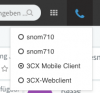
I managed to get "3CX Webclient" to show up as a choice:

Greenshot 2018-09-04 07.25.25.png

This appears after setting

3CX > Settings > PBX > Enable WebRTC softphone in Web Client (BETA)

to true. Without this, the "3CX Webclient" option is missing.

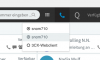
My phone extension in webclient is green and available:

Greenshot 2018-09-04 07.30.52.png

What else could cause "Make Call" to disappear?
 
Please note that the "3CX Webclient" option is not the same as the "3CX Mobile Client". Since the option is missing please follow the procedure i suggested in me previous reply.
 
Hi YiannisH_3CX.

Thank you - again, this worked. When I select 3CX Mobile Client, I got my "MakeCall" back :-)

Greenshot 2018-09-05 14.12.20.png

But, just to get this right - The "3CX Mobile Client" is an option that comes with SP6, right?

Regards, Christian
 
Glad to hear the issue has been resolved.

But, just to get this right - The "3CX Mobile Client" is an option that comes with SP6, right?
This is how you were able to perform "Make Call" with the previous version as well so this did not come with SP6. For some reason your extension de-registered from Push and you needed to re-register it to get the mobile agent back.
 
Thank your for clarification :-)

Christian
 
Glad i could help
 
Status
Not open for further replies.

Latest Posts

Forum statistics

Threads
111,893
Messages
589,599
Members
164,763
Latest member
Techmansam