No Outbound Lines Were Available

cstaat

SMB User
Joined
Nov 18, 2025
Messages
5
Reaction score
0
Hello- Going through the process to get 3CX up and running and I'm getting close.
I am having issue making outbound calls. I am using Flowroute for my trunk/ SIP.
When trying to make an outbound call I get "no outbound lines were available for this call"
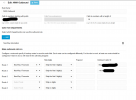
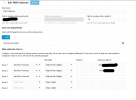
Attached is a screenshot of our outbound rule.
 

Attachments

  • Screenshot 2025-11-18 163209.png
    Screenshot 2025-11-18 163209.png
    52.5 KB · Views: 27
Is your trunk up and showing Green status?
 
did you set an outbound rule?
 
Also, stripping 8 digits on a 10 digit number? You are trying to call a phone number that is only 2 digits long?
 

Attachments

  • Screenshot 2025-11-18 163209.png
    Screenshot 2025-11-18 163209.png
    52.5 KB · Views: 15
In your outbound rule something i don't see why you set it like that, why did you set 3 routes the same trunk?
normally different routes are to be used with another trunk or a backup route but not the same as default.
 
In your outbound rule something i don't see why you set it like that, why did you set 3 routes the same trunk?
normally different routes are to be used with another trunk or a backup route but not the same as default.
I removed them and still the same issue, "no outbound lines were available"
 
But if your "length" is 10 and 8 digits are a prefix then it's only a 2 digit number (8+2). Try setting the length to blank since you're dialing the 8 digit prefix...it can't conflict with many other numbers dialed I'd think.

Also just to ask, do you have another trunk/rule being used for numbers without that prefix?
 
But if your "length" is 10 and 8 digits are a prefix then it's only a 2 digit number (8+2). Try setting the length to blank since you're dialing the 8 digit prefix...it can't conflict with many other numbers dialed I'd think.

Also just to ask, do you have another trunk/rule being used for numbers without that prefix?
No additional rules.
I have the prefix filled out to match Flowroute, the length is blank. = No change
If i remove the prefix I get "call forbidden by administrator"
If i change the "strip digits" to 0= No change
 
I don't follow the "from Flowroute/match Flowroute"...they have told you to set up a custom dialing prefix? That is typically only used when doing custom routing...for example, dial 11 then a number to use TrunkProviderA, or 22 then a number to use TrunkProviderB. That's not in https://www.3cx.com/docs/sip-trunk/flowroute-usa/ nor do I see it in their KB https://support.bcmone.com/docs/flowroute-3cx-v20-and-portal-setup-guide#outbound-calling.

The caller is in the Automation department?
I just followed the steps from the Flowroute website and now get "Call forbidden by administrator"
 

Forum statistics

Threads
111,974
Messages
590,083
Members
164,899
Latest member
mazet