Solved No outgoing audio on external calls - Yealink VP530

Status
Not open for further replies.

advlaser

Forum User
Joined
Oct 27, 2013
Messages
60
Reaction score
6
I have a problem with a Yealink VP530 where if I make an outbound call, there is no outbound audio, but inbound audio is fine. But if an incoming call is answered, it's the opposite, outbound audio work, but there is no inbound audio. The phone is on a different subnet, but joined by hardware vpn. 3CX Phone for windows works great both ways from the same location. I can ping from either end. This was a working setup and seemed to come out of nowhere with no recent changes. I've since upgraded firmware and reprovisioned to no avail. any ideas on what to try?

3cx v15 sp5
IP 192.168.1.15

Yealink VP530
Firmware: 23.70.0.63
IP 192.168.10.26
 
It is most likely a NAT problem. It may be associated to the router and/or your cable modem if connected to the internet in this manner. SIP ALG should be turned-off/disabled in both. It may also be due to the VPN and different subnet and how 3CX sees the extension as being remote or local.
 
It is most likely a NAT problem. It may be associated to the router and/or your cable modem if connected to the internet in this manner. SIP ALG should be turned-off/disabled in both. It may also be due to the VPN and different subnet and how 3CX sees the extension as being remote or local.

I checked sig alg are turned off on both routers.
 
It is most likely a NAT problem. It may be associated to the router and/or your cable modem if connected to the internet in this manner. SIP ALG should be turned-off/disabled in both. It may also be due to the VPN and different subnet and how 3CX sees the extension as being remote or local.

I doublechecked and SIP ALG is disabled on both routers.
 
if you like, you can post a capture of a call with the issue. we may then be able to identify why.
 
Here are the logs for a 3 second call. In this case the call was inbound to the 3cx system and inbound audio could not be heard.

04/24/2017 9:46:43 AM - [CM503003]: Call(C:609): Call to <sip:[email protected]:5060> has failed; Cause: 487 Request Terminated/INVITE from 127.0.0.1:5488

04/24/2017 9:46:40 AM - NAT/ALG check:L:609.1[Line:10000<<anonymous] REQUEST 'INVITE' - some of SIP/SDP headers may contain inconsistent information or modified by intermediate hop Media session IP ('c=' attribute) is not equal to the IP specified in contact header: Media session IP:XX.XX.XX.152 Contact IP:XX.XX244.1 Media session IP ('c=' attribute) is not equal to the SIP packet source(IP:port): Media session IP: XX.XX.20.152 Received from: XX.XX.244.1
 
Last edited by a moderator:
I tried turning on the verbose log and posting that. but it was too long to post.
 
Hi Advlaser,

Sorry if its an obvious question, but I have not seen it addressed yet.

Does the Firewall Checker all pass?

And secondly, have you tried provisioning the phone in both Local and Remote (STUN) mode?
 
Sorry, but I mean a wireshark capture. This is a log which provides general information, but the capture will show the flow along with the details of the ports being used and the SIP headers. You can download wireshark at wireshark.org.
 
Hi Advlaser,
Sorry if its an obvious question, but I have not seen it addressed yet.
Does the Firewall Checker all pass?
And secondly, have you tried provisioning the phone in both Local and Remote (STUN) mode?

All clear on the firewall check. As for provisioning the phone in stun mode. What do I need to do there? I changed the SIP server to my external address. My stun server was blank, so I changed that to my external IP as well and changed the port to 5060. But I had no service. What else do I need to do? I have users using 3CX mobile apps, so it's open, but they normally use 3cx tunnel as well. Thanks!
 
All clear on the firewall check. As for provisioning the phone in stun mode. What do I need to do there? I changed the SIP server to my external address. My stun server was blank, so I changed that to my external IP as well and changed the port to 5060. But I had no service. What else do I need to do? I have users using 3CX mobile apps, so it's open, but they normally use 3cx tunnel as well. Thanks!

Actually I got that to work hitting the external IP address. I just needed to restart the phone. Unfortunately the incoming audio in that mode still doesn't work. I'll install wireshark and see what I can find there.
 
Last edited:
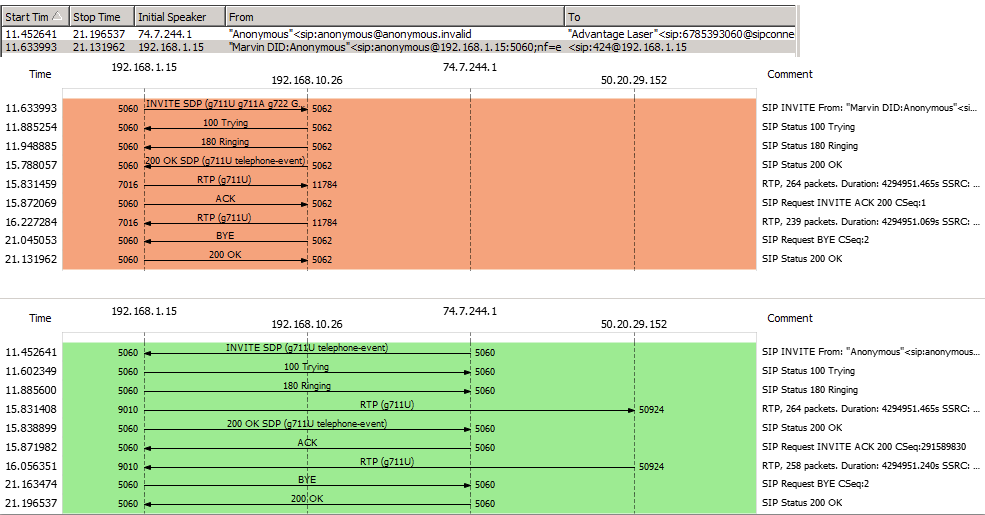
OK, here's my wireshark flow from my call. I'm not sure if this is what you want. It's above my paygrade... (I have no clue) Thanks!

wsflow.png
 
Hi advlaser,

I have sent you a p.m., please check your inbox.
 
FYI - This problem is solved. It turns out my DHCP server somehow handed out the same IP address to two clients. So once I changed my IP address to a static address, the problem went away.
 
Glad to hear the issue is resolved and thank you for sharing your solution
 
Status
Not open for further replies.