No Sound on incoming and outgoing calls with 3CX cloud hosted after upgrade

Status
Not open for further replies.

Richard K Palmer

Customer
Joined
Feb 7, 2022
Messages
6
Reaction score
0
I recently tried to switch to 3CX's cloud hosted. I currently host in the cloud server running Server 2012r2 (which I really do not want to upgrade). I currently have V16. I followed the instruction exactly to switch over. There are 2 issues I am having. The first is that I am not running SBC and when trying to install it, it fails to connect. I installed it on a Windows 10 VM, but to no avail. I use a stun server currently for my configuration of the phones (I am using Yealink T46G's) I have at most if everyone is in the office, 8 phones connected. I really do not want/need the SBC because I want my staff to be able to take their desk phones home to work because of Covid and weather issues. I really want to keep using the stun server if possible.
Anyway when I tried to switch/upgrade, we lost audio both incoming and outgoing. The phones ring, but we cannot hear the customers no can they hear us. Any advice would help
Richard Palmer
 
2012 isn't supported.

Does the firewall checker pass?

Do you have the ports forwarded for each of the phones?
 
Last edited by a moderator:
  • Like
Reactions: Charles_3CX
Ports are forwarded. I even turned off the firewall temporarily to check. V16 is working right now on 2012 but I really dont want to upgrade it because I want to switch to 3CX's cloud and no longer administer the server myself.
 
You turned off the firewall in front of each phone...? Each phone needs ports forwarded...I'm not clear if that's what you meant.

At some point 2012 was removed. I don't recall the timing exactly but I think it was somewhere in v16. As I seem to recall Apple/iOS push notification for calls required something not in 2012 R2. If you look back through the forum and/or their blog a year or two ago you should find info.

Re: planning for 3CX hosted, note they don't support STUN.
 
Last edited by a moderator:
I have opened up all the ports required and briefly turned off the firewall on my whole network to see if that had any effect. Currently though with my virtual server off site and in the cloud, I am having no problems. I had to go back to what has been working. Yes, IOS push notifications are not working and that is another reason I want to switch. I do not want to keep 2012r2 running in the cloud anymore or upgrade my OS. I really want to get away from managing my own servers. That's why I like the idea of using 3CX cloud hosting my phones. Basically, the current configuration is working, but when I tried to switch to 3Cx's hosting with V18, I have no sound either direction.
 
I enter the key and it installs, but it never connects. I have tried so many ways including just turning off the firewall in both Windows 10 as well as my network firewall at the same time to see if its a firewall issue. I have run the firewall checker on my cloud server and it comes back good with no errors. The only thing I can think of is that I am running on a VM. I have assigned the VM to its own IP address and not share with any other computers.
 
I am assuming it's failing when I enter the authentication key. The SIP trunk (SBC) just shows not connected.
 
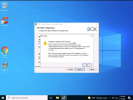
It gives me the error
1644314144701.png
 
Last edited by a moderator:
You might want to remove that picture and edit so that your URL isn't listed.

Can the windows 10 computer resolve that URL? If you try to open the management console in chrome do you get the login page? Just asking in case you have a local domain or DNS and the split DNS is still pointing to the local hosting.
 
On the windows machine check the c:\windows\system32\drivers\etc host file for any entries for the fqdn, if exist , remove.

Note :run notepad as administrator to edit
 
You might want to remove that picture and edit so that your URL isn't listed.

Can the windows 10 computer resolve that URL? If you try to open the management console in chrome do you get the login page? Just asking in case you have a local domain or DNS and the split DNS is still pointing to the local hosting.
He probably should but it might be helpful that he didn't... that domain doesn't exist if I try to look it up which is a pretty fundamental problem.

I would think the SBC would throw exactly that error under those circumstances. The error message even says "Check the provisioning URL".

I'm wondering if there is some issue of restoring from backup (when moving from v16-18) causing issues with the FQDN.

@Richard K Palmer , you should still obfuscate the url in that picture just in case.

Not related to your problem but I wouldn't touch a Windows SBC. A Debian SBC will be faster to install, less demanding and more reliable.

Also, consider getting staff to use the 3CX app (either from the 3CX web app on a PC or the ANdroid / IOS app) to work from home rather than taking their hard phone with them. On a domestic broadband connection it just works whereas dropping a phone in without an SBC may well require firewall configuration.
 
  • Like
Reactions: NickD_3CX
First off, I have edited the FQDN out of the screenshot as it is sensitive information and this is a public forum.
Secondly, what I would first recommend you try is, since you're going to be using this same windows machine as the SBC, access the 3CX Management Console from a web browser on this same windows machine (the SBC host), can you reach it?

Once you've confirm you can reach it, you should then make sure that you're actually installing the 3CX V16 SBC and NOT v18( I see the installer on your desktop so I'm guessing that's what you used).

To download 3CX SBC v16:

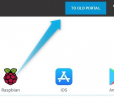
1. Access the customer portal, click on the "To old Portal" on the top right:
1644314881825.png

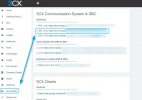
2. Click on downloads and then under "Windows" SBC (v16):

1644314989559.png

3. Run the SBC v18 installer again to uninstall the currently installed SBC and then, run the v16 SBC installer and proceed with the setup.

Let us know how it goes!
 
Status
Not open for further replies.

Forum statistics

Threads
111,974
Messages
590,083
Members
164,901
Latest member
Silent_Guru