No Voice Yealink T42S

Status
Not open for further replies.

Cem

Joined
Nov 9, 2018
Messages
7
Reaction score
0
I successfully set up the Yealink T42S and connected it via SBC - it works.

Unfortunately no voice or audio doesn't work.

Phone function works

Can anyone help me?
 
Have you tried "PBX delivers audio" under options tab of EXT?
 
jep - tried that but unfortunately no difference to prvious - call get's connected but no audio
 
Is it all calls? INT and EXT?
 
Yes all calls
 
Assuming you're on latest firmware and 3CX PBX passes all firewall tests?
 
This phone wasnt previously STUN then you introduced SBC was it?
 
jep - but made a factory reset before SBC
 
You dont have a Draytek do you? If so, you tried rebooting it? Other then that, I'd try doing a wireshark and seeing where the audio is going. What other phones you got on the SBC? do softphones work?
 
softphones are working - now we trying with a wireshark
 
Unfortunately, we couldn't find out anything with Wireshark.
 
Hello @Cem

Do you have other phones behind the same SBC that do work? What happens if you call a 3CX client? Does that work or is there no audio? Is there no audio in both directions? Have you switched the provisioning method in the management console?
 
Hi there I'm working with Cem... on the same issue

currently we only have Software Phones via SBC connected to the PBX - they are working fine
 
for provisioning - do I have to provisioning via SBC or directly via PBX ?
 
Have you restricted which Codecs are to be used by the set? Does the Activity Log show anything?
 
Hello @Joe62

Softphones on a remote location will use their own tunnel to connect to the PBX and will not run through the SBC.
If you have an SBC installed then you need to switch the provisioning method in the PBX to SBC and factory reset the phones. The phones should then appear in the Phones tab of the management console as new so you can auto provision them to the extension.
 
Sorry - how do I switch the PBX to SBC - can‘t find it ....
 
Sorry - how do I switch the PBX to SBC - can‘t find it ....
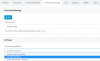
Under each extension there is a phone provisioning tab. The provisioning method for the phone under the provisioning tab should be set to SBC.

2018-11-28_14h02_04.png
 
Status
Not open for further replies.

Latest Posts

Forum statistics

Threads
111,901
Messages
589,636
Members
164,768
Latest member
Eagle Man