Solved Not able to call out from call history

Status
Not open for further replies.

Serco

Forum User
Joined
Mar 15, 2019
Messages
37
Reaction score
5
Hi 3cx community

Over the weekend we migrated our phone system onto 3cx from an old freepbx version and today we have been running with it (scary times!)

however, everything seems to be working very well indeed - apart from the issue linked to the post subject :oops:

Calls are able to go out if any user types the number in directly so outbound calls are working, just not through call history?
I imagine this is a simple fix but being new to the software, I am hesitant to make changes that might bring the system down!!

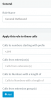
for now I have a default outbound rule which is set as follows - nothing else:
11246

This is set to make outbounds calls through our main trunk (which includes all user DDI's).

I am waiting for my voip provider to come back with details on how they expect calls to be received, but given direct dials work I think the setup above must work to some extent. clearly missing something here

any assistance gratefully received as usual
Andy
 
Couple of things.

Check your E164 settings - Settings E164 Processing.

Check the activity log, to see the format of the number coming into 3CX, this way you should be able to work out the outbound rules

If you look at the call history, can you see format of the number - does it match the incoming call format
 
Last edited:
Thanks Saqqara

OK, not too sure what to be adding right now in the E164 processing part, but have had a look in the log and have seen a message as follows:

07/08/2019 1:10:36 PM - [Flow] Target endpoint for SelfStore can not be built!

when i checked the call history, it has tagged 'selfstore' to the end of the external caller phone which is in a normal format with no 44/+ or extra digits

selfstore has been tagged as a prefix somewhere in the system so that our sales / CS teams can identify which business the call has come from (we have 3 separate IVRs running for 3 trunks)

does that make sense? I assume the prefix is being read as a call prefic=x instead of an identifer.
 
Do you know where you have tagged the 'selfstore' within the system, if so I would remove it and see if you can dial out.

Normally you would add this type of tagging - Under Settings - Contacts - Options
 
Its in the caller-id part of the inbound. It has a source pattern of (.*) and 'replace with' Selfstore

gives our users a nice little note that the caller is for selfstore business. We do have nothing in th outbound part....... could we add something here to allow calling outwards?

i have had a quick peek at the contacts section and was a little confused on how we would point a contact (say called 'selfstore') to enable a name to appear on an incoming call to the IVR)
 
Calls with come into the IVR, guessing the calls are routed to queues or ring groups depending on the option pressed. If you name the queue or ring group Selfstore it will add the name of the queue or ringgroup to the display on the phone.

Using caller-id part of the inbound , you are replacing all the incoming phone numbers with text 'Selfstore', and this is why dialling call history is not working
 
Last edited:
we are using ring groups but these are named 'Sales' & 'CS' rather than the business names. Then each trunk links to a separate IVR with the business message, but all calls go to either 'Sales' or 'CS' (so in other words the ring groups are accessed by all 3 businesses)

I suppose we could create more ring groups and edit each name for the business, but we struggle with the amount of characters on screen as they push the number calling off the screen!!

Perhaps i need to read up on caller ID patterns to see if I can find a method of adding an outbound pattern which might strip the selfstore off and dial the number.

I'll have a look around and see what we can do. Thanks for your help (doesn't surprise me that we are doing this wrong :-))
 
Hi,
don't know if this can help, for example my french sip provider send me only 9 digits on 10 to have complete number. for us the 1st digit removed is a 0, so if i don't add an inbound mask to reformat a 10 digit number , call history can't work due to 0 missing in the start of number.
this is an example for re-add one digit "0" to what is received from sip provider
11255
 
Its in the caller-id part of the inbound. It has a source pattern of (.*) and 'replace with' Selfstore
I would recommend deleting this rule and add an Inbound rule for that DID naming it Selfstore. This way you will preserve the original caller ID and know where the call is coming from.
 
Thanks YiannisH, a ws2p & Saqqara for your suggestions. I am going to do some testing with a spare trunk number and see what works here. I can see and understand we are doing this wrongly and so just need to find a solution to get it to function.
 
Hello 3cx community

I found my issue after some further research on this forum looking at other posts for similar requirements.
I created a test trunk / new inbound rule / IVR / ring group etc and added one extension into it. Gave the inbound rule a name to link the business name and tested - didn't work - sad times.

however, I discovered from another post 'subject - Identifying incoming calls' that the problem was linked to the DDI's not matching exactly on the rule / trunk. Once I edited my trunk number to match the rule, the name filtered through in my test environment.

Tested calling back from caller history and this worked absolutely fine :)

Have a solution to fix the live environment. Once again, thanks everyone for your assistance and suggestions.
 
  • Like
Reactions: YiannisH_3CX
Status
Not open for further replies.

Forum statistics

Threads
111,931
Messages
589,804
Members
164,803
Latest member
fcentral