Not able to Provision Yealink T21P E2

Status
Not open for further replies.

Shreekant

Customer
Joined
Nov 29, 2021
Messages
25
Reaction score
4
I am not able to Provision the Yealing phone which is running on the latest firmware 52.84.0.35 and 52.84.0.125. Additionally, the phone which got Provisioned I am not able to access the phone with the web.
 
  • Like
Reactions: Shreekant
Hello,

You are currently using older firmware. I highly recommend you read our guide here to help you get started and to install the correct firmware: https://www.3cx.com/sip-phones/yealink-t20p-t22p-t26p-t28p/

Also, kindly read the guide that @Saqqara posted above, then provide us with information so we can better understand how you were trying to provision them in your specific case.
 
I think you probably missed something (or you were looking at the Yealink site instead of ours).

Please read this guide again and follow the links inside to reach the latest version that 3CX provides
https://www.3cx.com/sip-phones/yealink-t20p-t22p-t26p-t28p/
I tried with both firmware as an option (52.84.0.35 and 52.84.0.125) both didn't work for me, the .35 is recommended by the 3CX and I downloaded it from the 3cx site but the end result was same.
 
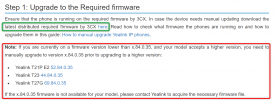
1643637158405.png

The part in red is just a note, only for people who are on a version lower than .35

You should follow the part in green.
 
Last edited:
  • Like
Reactions: JohnS_3CX
Status
Not open for further replies.

Members Online Now

Forum statistics

Threads
111,832
Messages
589,283
Members
164,662
Latest member
DejanMDS