Not latest firmware update via management console

Status
Not open for further replies.

Drogtorri

Customer
Basic Certified
Joined
May 15, 2018
Messages
12
Reaction score
0
My phones Yealink T41S are not updating to latest firmware cuz they are on 66.83.0.55
I found that i must update to 66.84.0.35 and then go to 66.85.0.5.

This is insane to do that manually.
1) I must open every phone console
2) Copy web password.
3) Those pages are opening only via "thisisunsafe" typing in new browser safety for not trusted https.
4) Then if i changing settings to any user, i must change all ID and passwords to meet new 10-character requirements. Even that web password.


Is there any way to add that firmware to management console to avoid upgrading via http?
 
Hi,

Unfortunately there is not much that can be done in your case. Yealink will not allow phones to jump to the very latest version from your current version, unless you first install the version in between.

There is no way to do it via the management console. You might have to contact Yealink to see if there is some other way to do it en masse without involving 3CX.

As for passwords and Auth ID, if your phones are already provisioned, you can use the "Regenerate" button in the Users page. This will generate strong passwords, and reprovision the devices automatically.

PS: The browser safety message is due to modern browsers becoming more secure over the years, and the firmware currently on the phones now is not meeting their minimum expectations.
 
Hello

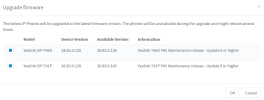
I have noticed on a few 3CX installs with Yealink phones that there appears to be a new FW released but it is not possible to push it out from the 3CX Admin console....is it because this special Update 6 FW release is still below the x.84.x.x Version that they all need to be upgraded manually via the Phones' UI?!

Is it possible to push these updates out to all phones on each installation please via 3CX management console?

eg;
1676381653324.png


Thanks
William
 
Hello

I have noticed on a few 3CX installs with Yealink phones that there appears to be a new FW released but it is not possible to push it out from the 3CX Admin console....is it because this special Update 6 FW release is still below the x.84.x.x Version that they all need to be upgraded manually via the Phones' UI?!

Is it possible to push these updates out to all phones on each installation please via 3CX management console?

eg;
View attachment 34255


Thanks
William
Hi William,

The update addresses this specific issue - the inability of the phone to download files from 3CX over HTTPS (including firmware files).

So it needs to be done manually I'm afraid.
 
Last edited:
Okay NW thanks! Thanks for your reply
 
Status
Not open for further replies.

Members Online Now

Forum statistics

Threads
111,832
Messages
589,285
Members
164,662
Latest member
DejanMDS