Not more then 2 user in webmeeting

Status
Not open for further replies.

troneleck

Forum User
Joined
Aug 3, 2020
Messages
7
Reaction score
0
Hello,
my company owns a SC16 PRO License.
The phone system is running well, but we can't make a web meeting with more than 2 user.
Our 100Mbit connection should be enough for a couple users.
Any suggestions where I can start, to pinpoint the problem?
 
Hi,

When you say "we can't make a web meeting with more than 2 users" what do you mean exactly?

- Cannot create meeting?
- Any error messages appear?
- Issue when joining?

Please give us more details so we can better understand
 
With 2 user we get sometimes a loading screen.
With 3 or more it's not possible to make a meeting because we get freezes on video and audio.
There are just black video boxes where a user should be.
Sometimes the audio kicks in for 1 or 2 seconds, but it sounds like a robot.
Chat is the most time working.
 
Do you (as a meeting organizer, not as a participant) also see a warning message that there isn't enough available bandwidth?
 
If i remember right there was some kind of message on the bottom from the screen.
I think it was some kind of "not enough bandwidth for video".

I made 2 tries, one with 4k on cloud and one with 4k on Frankfurt (max I was able to chose).
Both with the same result.
 
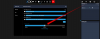
Ok, that message basically informs you that at least one person in the meeting does not have enough bandwidth to keep up, and you will need to reduce the meeting quality in order to get a better experience
1596522930220.png

This may be due to one of the external participants being on a slow connection, or due to network congestion not allowing you to use your connection to the fullest. Either way, the webmeeting server has detected this and shows you the warning so you can at least make the adjustment.

Can you give it a try and let us know how it goes?
 
I used this slider on my second try.
Second try was only on the same branch office.
No change at all.
 
For troubleshooting purposes, do you have the ability to bypass your firewall and connect a couple of PCs directly to the internet?
 
The firewall was my first idea, but another branch office have control about it.
This is a slow process. I'm in contact with them and I hope they schedule me some "free" time.
I report back after I get new information.
 
If your office connects via VPN to the main office and then goes out to the internet from that point, there may actually be bandwidth restrictions (especially on upload) which can indeed affect the quality of the meeting.

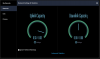
Under Settings > Network you can also see the capacity of your connection (so even though you have 100mbits you might not be allowed to use it all). The maximum will change depending on the quality you selected so "Balanced" quality should show about 1mbit and "Quality" should show about 2mbit upload.
These are the results you should expect to see when you connect alone to the meeting and are not limited by your connection (example below is running "Balanced" and HD is not enabled)
1596527647866.png

We have a guide for administrators to help whitelist the MCU servers https://www.3cx.com/user-manual/video-conferencing/troubleshoot/#h.un1xs9mtwt9s
 
Status
Not open for further replies.

Forum statistics

Threads
111,973
Messages
590,078
Members
164,896
Latest member
sameage