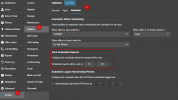
The report emails are scheduled once per day. This is defined in the System > Options > Scheduler page
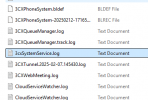
You can also check your system Server log file (from the support info file) to see what is happening at the time your reports are scheduled
2025/02/12 17:18:02.352|0044|Info| [_3cxSystemService.ScheduledReports.SendReportEmailsJob] Attachment for report 'test' has been created.
2025/02/12 17:18:02.355|0044|Info| [_3cxSystemService.ScheduledReports.SendReportEmailsJob] Sending Scheduled reports for extension '100' to extension's email address
2025/02/12 17:18:02.355|0044|Info| [_3cxSystemService.ScheduledReports.SendReportEmailsJob] Preparing the email template for extension '100'
2025/02/12 17:18:02.360|0044|Info| [_3cxSystemService.ScheduledReports.SendReportEmailsJob] Sending scheduled reports email to
[email protected]
2025/02/12 17:18:02.478|0044|Info| [_3CX.HttpClient] Sending 'POST/1.1' to '
https://login.microsoftonline.com/xxxxxxxxxxxxxxxxxxxxxxxxxxx/oauth2/v2.0/token'
2025/02/12 17:18:02.987|0044|Info| [_3CX.HttpClient] Received '200 OK' after 509.5ms
2025/02/12 17:18:02.988|0044|Info| [_3CX.HttpClient] Sending 'POST/2.0' to '
https://graph.microsoft.com/v1.0/users/[email protected]/sendMail'
2025/02/12 17:18:03.341|0022|Info| [_3CX.HttpClient] Received '202 Accepted' after 352.9ms
2025/02/12 17:18:03.349|0022|Info| [_3cxSystemService.ScheduledReports.SendReportEmailsJob] Sending Scheduled reports for extension '100' to individual email recipients
2025/02/12 17:18:03.350|0022|Info| [_3cxSystemService.ScheduledReports.SendReportEmailsJob] Preparing the email template for individual report 'test'
2025/02/12 17:18:03.350|0022|Info| [_3cxSystemService.ScheduledReports.SendReportEmailsJob] Sending the email template for individual report 'test' to external recipients
2025/02/12 17:18:03.350|0022|Info| [_3cxSystemService.ScheduledReports.SendReportEmailsJob] Sending scheduled reports email to
[email protected]
2025/02/12 17:18:03.379|0022|Info| [_3CX.HttpClient] Sending 'POST/2.0' to '
https://graph.microsoft.com/v1.0/users/[email protected]/sendMail'
2025/02/12 17:18:03.528|0044|Info| [_3CX.HttpClient] Received '202 Accepted' after 149.4ms
In my example we can see that the email was sent successfully. I got the 202 Accepted after 149.4 ms
You should be able to see something similar with your email server, irrespective which server you are using.


 Working Emails:
 Not Working: