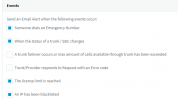
Not receiving trunk status change notification

Status
Not open for further replies.

Maz_17

Free User
Joined
May 7, 2023
Messages
7
Reaction score
3
Hi all,

I’m hoping someone can help me with this…

I’ve enabled other email notifications and they’re working/being received just fine…apart from the SBC or Trunk status change that is. I’ve performed a fresh install without restoring from backup or upgrading from v18 - just used the 3CX iso and config file from portal so everything’s ‘vanilla’

There’s only one Yealink T54W connected to the PBX via ‘direct’ as a router phone. It is however configured via a custom template (only few parameters like display brightness and background image have been changed really)

I’ve had the phone unplugged for over an hour and no email is received when it goes offline nor when it comes back online. Any ideas as to why this notification would fail to fire off? The phone (SBC) does disappear from the phone list and does show red/offline under Voice & Chat. Weird?…

Cheers
 
Hi,
Thank you for taking the time out to respond!

I just realised I never made it clear that I was using v18 and now I've upgraded to a clean install of v20 - my bad!

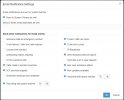
I've attached a screenshot of my current notification setup on v20v20 Notifications Setup.jpg

As you can see I've ticked the Trunk/SBC are down checkbox, however no email is received. I've received other notifications such as trunk error codes/services stopped/calls blocked thus far and can confirm emails are in fact being sent out without an issue.

No log or sign of an error is also shown in the Dashboard about this to. Would have expected to see an email was fired off log-entry?

My current setup involves a T54W on latest firmware (just upgraded few days ago in fact) with 3cx v20 running on a VM locally. Would this make any difference if the PBX is local/on same network as the Routerphone SBC? Wouldn't have thought so...

Just to add, I have now entered an email address in the field 'Send to these email addresses as well' and will update the thread with my findings. I do have 'System Owners' checked which is how I have been receiving my other email notifications...
 
  • Like
Reactions: Lee Cramman
Given we're in the "Self-hosted" forum, it would be a bit odd to have PBX and SBC / phone on the same network...
 
Given we're in the "Self-hosted" forum, it would be a bit odd to have PBX and SBC / phone on the same network...
Haha really? How so I tried posting in the on-premise section but the forum wouldn’t allow it, said I needed an on-premise system? Confusing matters.

Is there something unorthodox then about having an extension setup as an SBC router phone when it’s on the same network? It gave me the option when I added the phone as “direct” I can alternatively configure it locally via lan of course no problems. Just want to make sure version v20 can be configured to run just aswell as I had v18 going. I plan to actually consolidate 2 different businesses (to be setup as different offices in v20) from 2 different PBX’s running v18 into one PBX running v20 now that we have use of offices and more control over company phone books
 
An SBC is needed to connect/proxy for phones on a separate network. It uses an encrypted tunnel. Not necessary on the same network. Not actually sure if it will work or not work…I would guess so as long as you’re using split DNS.
 
  • Like
Reactions: Maz_17
An SBC is needed to connect/proxy for phones on a separate network. It uses an encrypted tunnel. Not necessary on the same network. Not actually sure if it will work or not work…I would guess so as long as you’re using split DNS.
Ah, right. I was under the impression a dedicated SBC/router phone existed just to make an Admins life easier when managing multiple phones regardless of where the PBX actually was - and would help prevent local ports clashing/one-way audio problems and what not, removing any firewall mis-setups out of the question.

It does indeed work as expected, just no notifications when the phone is unplugged. No biggie really. I also need this deskphone to connect to other Extensions from other PBXs and I'm starting to suspect having this provisioned as a routerphone, is the reason why I'm unable to do so right now again. I'll re-provision as a local phone as I was able to get other Accounts configured manually just fine.

FYI yes, I do have Split DNS configured.

I'll leave SBC/Routerphone setups to where they're truly needed at remote locations from the PBXs.

Thank you Steve!
 
  • Like
Reactions: SteveITS
Haha really? How so I tried posting in the on-premise section but the forum wouldn’t allow it, said I needed an on-premise system? Confusing matters.

Is there something unorthodox then about having an extension setup as an SBC router phone when it’s on the same network? It gave me the option when I added the phone as “direct” I can alternatively configure it locally via lan of course no problems. Just want to make sure version v20 can be configured to run just aswell as I had v18 going. I plan to actually consolidate 2 different businesses (to be setup as different offices in v20) from 2 different PBX’s running v18 into one PBX running v20 now that we have use of offices and more control over company phone books
If someone is posting in self-hosted I make different assumptions to on-premise.

99% of VOIP is networking so starting from the wrong understanding of someone's infrastructure / topology makes it trickier to help.

It might be worth asking support to get your license marked as on-premise so you can get access to the right forum if you have any issues in the future.

If you're consolidating / going multi-site in the future, I would only use a router phone if it can handle all of the SBC needs of the remote site. Personally, I wouldn't use multiple router phones per site, I would have a dedicated SBC or an SBC failover cluster.
 
Thank you for the information. I’ve since then switched the provisioning method from SBC/remote phone to locally.

I am hoping however, should/if the time comes and the phone will be in a remote location, the SBC notifications do come through if the internet were to go down.

Thanks again, I’ll reach out to 3CX support to discuss my install type
 
  • Like
Reactions: Lee Cramman
Status
Not open for further replies.

Latest Posts

Forum statistics

Threads
111,953
Messages
589,916
Members
164,851
Latest member
DrunkeMeister