I got 3CX and SF connected through the API. Tests worked. But nothing happens in SF yet at incoming or outgoing call. What do I have to do next? Install the native SF call center? Something else?
Do you see the contact name taken from Salesforce in the Web Client / Desktop app when you receive an inbound call? That's the first thing to check, if that doesn't work, nothing else will do.
Hi Ernesto,
Thank you for your reply
Yes, that works. Also, in SF, I discovered I can see a task generated with a minimal phone log now, on the contact record of the caller. And on the desktop app, if a colleague is calling someone, we can see who the collegaue is calling with (if the contact is in SF). So far so good it seems.
But I saw demo's online, where a pop up would come up with clickable contact information.
What do I have to do to get that?
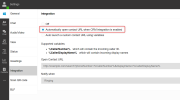
This popup is automatically launched by the Web Client or Desktop App, as long as you have the proper configuration in Settings > Integration. Check that setting, and also check if your browser is blocking popups. Please note that the popup is only for inbound calls, and it happens when you answer the call.
I have call journaling, chat journaling and Enable contact creation to my disposal, under settings/integrations/CRM. Which one should trigger the pop up?
I have call journaling, chat journaling and Enable contact creation to my disposal, under settings/integrations/CRM. Which one should trigger the pop up?
No, those are the settings on the server side (Management Console). You need to check the Web Client or Desktop app (depending on what you're using), and go to Settings > Integrations. There you should select this option:
Yup. Found it. It was already set at: "open on incoming call". Also checked Pop-up settings of the browser. Pop-ups are enabled, but java was disabled. i enabled it, it might help. in the desktop caller, i set it to use smartphone and not Desktop app. Does that make a difference (I was under the impression, the app would relay the call to my phone but that the app just keeps doing in the background what it does, like, opening a contact on my computer).