Solved Obihai phones with latest 3CX pbx

Status
Not open for further replies.

Michael Cole

Bronze Partner
Basic Certified
Joined
Mar 25, 2018
Messages
22
Reaction score
5
Hello, Been researching the net for how to configure an obi1022 and obi1062 with the latest release of 3CX. I have the system working perfectly with the windows client. Can call out. I have two systems configured - one in cloud and one on premises to eliminate the network as the registration problem. The obi1022 has been registered both manually and through the obitalk config. Nothing seems to allow it to register. I've created a sample template and entered the MAC. Still nothing.

I'm guessing 3CX uses the mac address method for filtering devices. The phone and mac are not seen under the phones menu in any way, yet are set in the extension phone provisioning tab.

What I'd like to do is just get the thing to access an extension and worry about the provisioning xml later.

Can anyone point me in the right direction or share a config?
 
Hi Michael,

These phones are completely un-supported, so no template available as you are probably aware:
https://www.3cx.com/sip-phones/

You could try and download a supported phone template (which you may of already done) and adjusted it for this brand of phones however I think this would be challenging. You may even wish to contact the manufacturer for help.

If I were you instead of going through all the bother, simply get yourself a cost effective "supported" phone, like a Yealink - they are $50.00 each here:https://www.amazon.com/Yealink-Enterprise-IP-Phone-line/dp/B00G6B7W0S
 
Thank you. And yes, I could always get a supported phone. But then I could also just use a different pbx service.

I'm evaluating 3CX. I like it. I have a dozen of these phones. The goal is to use what we already have. I'm hoping this community is open minded to working with SIP phones and can be helpful in resolving issues. Suggesting to replace is not a resolution. Do note obihai was just bought by polycom.
 
If you are evaluating 3CX then the first thing you need to understand is that it is an open standards PBX (which means anything that talks SIP can integrate in with the system) but there are different levels of support for each phone (no support, Legacy support, full support).

The reason why I suggested a fully supported phone is that the features and functionality you would get with these would far surpass the features you would get with an un-supported phone and thus give you a much better evaluation experience all round.

With an un-supported phone (currently) you will need to set it up manually (enter the phones interface and enter username, password and PBX/registrar address) to gain basic registration, however any additional features would need to be configured manually as well.

A fully supported phone offers not only out of the box provisioning and features, but also time saving benefits also.

What I would suggest you also do is evaluate 3CX Soft Client as well, it is a fantastic bit of software and if you have a USB headset handy you don't even need a desk phone.
 
@Michael Cole

Personally I do think that 99,9% of the IP phones who use the SIP protocol specified in RFC 3261 can work with 3CX Phone System.
Only supported phones can auto-provisioned with 3CX, all other phones must be manually configured.
First you have to create an extension in 3CX and then copy the credentials in to the phone, like User ID, Auth ID, Password, SIP server or IP-add.
Make sure “Disallow use of extension outside the LAN” is Off and the phone IP is not blacklisted in 3CX.

Good luck.
 
There is the community at work! Manual setup is my goal here. Let's ask the question a little different. What user password information should I be using for the generic sip phone? I've tried the extension number and the user name generated when adding the extension along with the password.

I've entered the 3CX IP address as the server. Is there anything needed on the 3CX side to allow the phone to activate? I'm not concerned with auto autvisioning at this time.
 
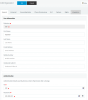
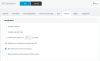
Please see screenshots.
That should be all settings you have to make.
 

Attachments

  • Knipsel1.PNG
    Knipsel1.PNG
    27.4 KB · Views: 407
  • Knipsel2.PNG
    Knipsel2.PNG
    18.5 KB · Views: 390
@complex1, my friend, you are beautiful!!! The issue was the username! Once I changed the username to the extension, the obi1022 worked! Such a simple resolution. Thank you.
 
Last edited:
  • Like
Reactions: Jeff Koertzen
I'm glad to help.
 
  • Like
Reactions: Jeff Koertzen
Status
Not open for further replies.

Latest Posts

Forum statistics

Threads
111,884
Messages
589,542
Members
164,743
Latest member
aa1