Occasional issues sending outbound SMS via Flowroute after updating to Version 20.0 Update 8A

jbarrett

Premier Customer
Joined
Dec 29, 2021
Messages
13
Reaction score
4
Our users are having periodic issues sending outbound messages after upgrading from Update 7 to Update 8A. We went directly from 7 to 8A, so I'm not sure if this is related to Update 8 in general or if it's related to the latest security fixes that were just released. Sometimes when a user tries to send an outbound SMS message, they receive the following error:
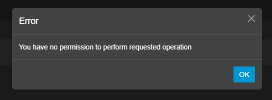
image.png

This appears to happen randomly and if they close out of the 3CX app and reopen or just keep trying it eventually goes through. Most outbound messages send without issue and as far as I can tell, we haven't had any issues with inbound messages. I haven't been able to find anything in the logs that provides any additional information. As far as I can tell, we aren't getting a rejection from Flowroute and they didn't see any issues on their end. I've also already tried generating a new API key with no change. We've confirmed this is happening on multiple 3CX clients, including the web client, PWA app, and the old electron desktop app. We haven't had anyone confirm it happening on the new windows app, but most of our users don't use that app for sending out SMS messages since it still doesn't support templates.

Has anyone else experienced this issue or have any ideas on the best way to troubleshoot?
 
  • Like
Reactions: vintegrity
Since the issue appears intermittently and no related entries are found in the logs, we recommend confirming whether the same behavior occurs across all users or is limited to specific extensions or departments.

Additionally, please ensure that the destination number is in E164 format.

Was the trunk configured using the default system template or is a custom/modified template being used?

In this scenario, we suggest opening a support ticket and providing the Support Info bundle with Verbose logging enabled while the issue is reproduced. This will allow us to review the logs and perform further analysis.
 
The same behavior happens across multiple users across different departments. It appears to be happening for everyone who uses their DID to regularly send SMS messages.

Flowroute requires SMS to be sent via E164 format and will reject it when a user tries to send it any other way, so I don't believe that is the issue.

The trunk was originally configured several years ago using the suggested default settings. I'm not sure if there have been changes to the template since version 18, but everything was working correctly until this latest upgrade from version 20 Update 7 to version 20 Update 8A, so I assume it must have something to do with the latest updates.

Regarding your suggestion to open a support ticket, would we just need to purchase support credits via the portal or are you talking about something else? This appears to be a bug with the latest release, so if we could avoid having to pay for support in order to get it fixed, that would be preferable.
 
@jbarrett do you have any time drifting issues on this machine ?
SSH to it and put this command " watch -n 1 date " .
This will show you live the time and the seconds.
Compare this online with a website that shows accurate time and seconds.
Compare it for the minutes and the seconds as well with your machine.
 
@jbarrett do you have any time drifting issues on this machine ?
SSH to it and put this command " watch -n 1 date " .
This will show you live the time and the seconds.
Compare this online with a website that shows accurate time and seconds.
Compare it for the minutes and the seconds as well with your machine.
No, the server time seems to be accurate. Checked against time.gov and time.is and it's accurate to within a second.
 
@jbarrett I would recommend telling your partner to open a ticket with us so we can check further.
 
@jbarrett I would recommend telling your partner to open a ticket with us so we can check further.
Ok, thank you. I'll reach out to them and get the process started.

I did also just receive some updated information from my users if it helps narrow down the issues.

I've confirmed that this has not happened on the new windows app, only web client, PWA and old desktop app. And it only happens when creating new conversations. Once a conversation has been established, it never happens on replies back and forth with the client.
 
  • Like
Reactions: NikosT_3CX
Hi,
I recently upgraded and am seeing the same message randomly. I'm also using Flowroute and the Web client.

Version 20.0 Update 8 (Build 1121 Release)
Windows 10 latest
 
Last edited:
Hi to all,

The issue has been noted and traced. A fix for this will be included in an upcoming release. Check the changelogs, and I will try to also confirm on-thread when it comes.
 
  • Like
Reactions: vintegrity

Forum statistics

Threads
112,064
Messages
590,575
Members
165,019
Latest member
rsaldin@advancedbrainspin