- Joined
- Oct 27, 2021
- Messages
- 3
- Reaction score
- 1
Hey Folks,
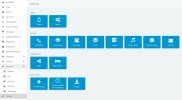
When I went to configure my 3cx for Teams integration, I went to my portal, and then to settings and noticed that the Office365 button is no longer visable. 3cx is hosting my PBX so I'm at loss of how to proceed. Has anyone else seen this and if so, how did you fix it?
When I went to configure my 3cx for Teams integration, I went to my portal, and then to settings and noticed that the Office365 button is no longer visable. 3cx is hosting my PBX so I'm at loss of how to proceed. Has anyone else seen this and if so, how did you fix it?