Office 365 Calendar Integration

Status
Not open for further replies.

gbhouston

Customer
Joined
Jan 15, 2020
Messages
11
Reaction score
1
Greetings,

I've successfully configured the Office 365 integration and am primarily interested in the functionality that updates an extension's presence based on calendar items. Currently I have the integration set just for my mailbox, however when I create a test calendar event in O365 with the appropriate "Away" designation in the "Show As" field, I don't see 3CX updating my extension status.

Any ideas?
 
Greetings,

I've successfully configured the Office 365 integration and am primarily interested in the functionality that updates an extension's presence based on calendar items. Currently I have the integration set just for my mailbox, however when I create a test calendar event in O365 with the appropriate "Away" designation in the "Show As" field, I don't see 3CX updating my extension status.

Any ideas?
If you add an event right now, the status won't change.

Try adding an event at least 15min from now and see if your status then changes. It should.

Remember the mapping of statuses explained in Settings -> Office 365 -> Calendar.
 
No luck there, I'm afraid. I created a calendar event for 30 minutes out and still no luck in updating the status.

If you add an event right now, the status won't change.

Try adding an event at least 15min from now and see if your status then changes. It should.

Remember the mapping of statuses explained in Settings -> Office 365 -> Calendar.
 
No luck there, I'm afraid. I created a calendar event for 30 minutes out and still no luck in updating the status.
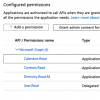
Please verify on the Office Dev Center if your app has the right permissions to see the calendar.

Check the 3CX docs for details.
 
Please verify on the Office Dev Center if your app has the right permissions to see the calendar.

Check the 3CX docs for details.

These are the rights as configured in O365.
13916
 
I haven't read the document but wouldn't 3cx need Calendar.Write?
 
I haven't read the document but wouldn't 3cx need Calendar.Write?

Not according to the document (https://www.3cx.com/docs/office-365-integration/). It specifies “Calendars.Read”.

I can definitely change and see if that fixes the problem, but it shouldn't be writing any data back to the calendar. It's looking at the "Show As" field for calendar events and then using that to determine 3CX presence.
 
I haven't read the document but wouldn't 3cx need Calendar.Write?
No it does not.

If you to the Office 365 Integration page in the 3CX settings, does a blue bar appear on top saying "Status: OK...."?
 
Indeed it does.
Just for the sake of being sure, are you sure you are creating your event in the right Calendar? Only the main O365 calendar will work I believe.
 
Just for the sake of being sure, are you sure you are creating your event in the right Calendar? Only the main O365 calendar will work I believe.

Yes, I'm creating the event on my main Office 365 calendar.
 
Then please open a ticket with 3CX for this issue. There might be configuration issues or a bug somewhere.

What version of V16 do you run?
 
Not according to the document (https://www.3cx.com/docs/office-365-integration/). It specifies “Calendars.Read”.

I can definitely change and see if that fixes the problem, but it shouldn't be writing any data back to the calendar. It's looking at the "Show As" field for calendar events and then using that to determine 3CX presence.

Yup - I was standing on my head when I read this thread.
 
Craig, did they sort this issue as i am having the same problem.
 
Status
Not open for further replies.

Forum statistics

Threads
112,325
Messages
591,898
Members
165,479
Latest member
Senergia