Office 365 Calendar Sync Issue

Status
Not open for further replies.

aschildmeyerSTR

Premier Customer
Joined
Jan 28, 2021
Messages
93
Reaction score
45
Hello,

Can anyone help with this potential shortcoming of the Office 365 Calendar synchronization feature?

What is happening is meetings on a users calendar all through the day, nights and evenings. As well as when people manually set there status to go on vacation vs actually putting a calendar item on there calendar.

Here are some scenarios of issue-
1. Office goes into closed mode at 5:30PM. All users go into DND as expected. A few users use there work calendar as there personal calendar so meeting invites pop up at 6PM-8:30AM causing there status to revert to available causing calls to come in.
2. User goes on vacation and doesn't handle outlook calendaring well so they do not place out of office on there calendar. But they do place themselves to away. A calendar invite seems to set them back to available as well once the calendar invite is over.

Has anyone found a good way around this? One would think 3CX should return ones status back to the original status that was set before the calendar invite vs just doing a blanket availability? This seems like a bug and a major failure in design. Is the only fix to disable calendar sync?
 
Can you not do global office hours to set the PBX up as closed at 5:30?
 
Can you not do global office hours to set the PBX up as closed at 5:30?
I can't we need to have it go into office hours as no one is working past 5:30. But even then if I disabled it and had people set there status to DND manually it appears the O365 calendar will set them to available anyways after a meeting is over that happens at say 7PM.
 
Im not sure what you mean? Global Office Hours will trump your extension status and inbound calls will go to destination out of office.
 
  • Like
Reactions: Evolute IT
Im not sure what you mean? Global Office Hours will trump your extension status and inbound calls will go to destination out of office.
This is true and that is how it works. The phone system sets the extension to DND following global office hours which is expected. But if a user has an O365 Calendar event in outside of office hours window it will then set the extension back to available after the calendar event is over. It's exactly like if a user manually set themselves to available. It's also like if a user sets themselves to lunch, then a calendar invite pops up during there lunch window and ends and sets them back to available when it should have kept them at lunch.

It's flawed it seems as it's not setting the original status the extension had prior to the calendar event happening. It's always defaulting to available after the calendar event it appears.
 
This is true and that is how it works. The phone system sets the extension to DND following global office hours which is expected. But if a user has an O365 Calendar event in outside of office hours window it will then set the extension back to available after the calendar event is over. It's exactly like if a user manually set themselves to available. It's also like if a user sets themselves to lunch, then a calendar invite pops up during there lunch window and ends and sets them back to available when it should have kept them at lunch.

It's flawed it seems as it's not setting the original status the extension had prior to the calendar event happening. It's always defaulting to available after the calendar event it appears.
You don't understand. Using the Global Office Hours and a properly configured inbound rule, the calls should never reach the extensions, whether they're available or not. It should go to a different "Out of Office" IVR or voicemail.

As for calendar statuses, use the "Show As" to determine that. The mapping table is in Settings > Microsoft 365 > Calendar Sync. Have them select it properly and it won't revert.

As said tho, it shouldn't matter if your system is configured correctly.
 
@aschildmeyerSTR
I have to say, I have tested different scenarios including the ones you mention on 3CX version 16.0.8.9 and was not able to reproduce the issue. Once the 365 calendar event ends, the extension involved always switched back to the profile status it was set before the 365 calendar event was triggered.

Is the issue you are describing affecting all users and does it occur for every instance of this specific scenario? If yes, and you can reproduce it at will, please provide as with the exact steps you are able to do so so that we can investigate it more.

Also, what version of 3CX are you running and on what OS?
 
  • Like
Reactions: Evolute IT
@aschildmeyerSTR
I have to say, I have tested different scenarios including the ones you mention on 3CX version 16.0.8.9 and was not able to reproduce the issue. Once the 365 calendar event ends, the extension involved always switched back to the profile status it was set before the 365 calendar event was triggered.

Is the issue you are describing affecting all users and does it occur for every instance of this specific scenario? If yes, and you can reproduce it at will, please provide as with the exact steps you are able to do so so that we can investigate it more.

Also, what version of 3CX are you running and on what OS?
Thanks @ChrisC_3CX Debian and version 16.0.8.9 enterprise. I will be trying to reproduce it because as of right now it's more of a correlation. Also it's what users are telling me, things like I set my "I set my status to lunch and I came back and I was available" Or "I set my status to away and it somehow is available" From what I can tell in those periods there is always a calendar event that appears so that is mostly why I believe it as so. Could the "Auto-Switch" under extension set someone's status back to available the next day if they set themselves to a certain status when leaving for the day prior?

Is there a specific log that I can look at to see if something fails on status changing so I can see if there is something there?
 
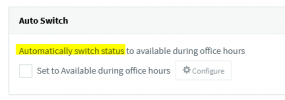
Could the "Auto-Switch" under extension set someone's status back to available the next day if they set themselves to a certain status when leaving for the day prior?
Yes.

1622038498990.png
 
You don't understand. Using the Global Office Hours and a properly configured inbound rule, the calls should never reach the extensions, whether they're available or not. It should go to a different "Out of Office" IVR or voicemail.

As for calendar statuses, use the "Show As" to determine that. The mapping table is in Settings > Microsoft 365 > Calendar Sync. Have them select it properly and it won't revert.

As said tho, it shouldn't matter if your system is configured correctly.
Thanks Frederick. I fully understand that. However we came off a ShoreTel phone system that had specific VM prompts per extension that users would set for when it was holiday or office hours. To try and replicate that functionality as we are a very individual service heavy business and relay a personalized message that the office is closed for that person we need the auto switch to happen. Weather it's on an inbound rule or not. If I set the inbound rule to go to users extension voicemail instead and don't leverage the auto switch then they will just hear the default voicemail greeting. So I would have to go back and make my users set the Default VM greeting as the outside office hours greeting then have them configure every status VM greeting to be the primary ones during business hours. That would be painful as most are configured to use Default for all forward statuses except DND and Away.

Also the show-as is set proper for the meeting and they are aware of how to do that. Just frustrating that users are reporting status changes when they manually set there status and they come back later to find it's back to available during business hours and the only thing that it appears that could have done that is a calendar invite on there calendar.
 
Right, very frustrating. It's seeming more like the default greeting will have to be the default OOF during office hours greeting and then force everyone to set up individual greetings per status as not to use the default greeting. They should just call the default greeting Outside office hours greeting (Assuming the inbound rule is set to send to VM per extension).

Edit - I just realized in my morning brain that @Frederick Marcoux is correct. I'm not using it right... I'm trying to make it something it's not and that I just have to get my users to set there status before ending the day to make sure the customer/client hears the right VM prompt. So that will fix the auto-swtich issue, thanks Frederick. But I still need to find the phantom that is setting people back to available during office hours that still appears to correlate to calendar meetings ending. Again, is there a log to check for this?
 
Last edited:
is there a log to check for this?
You should be able to detect a profile status switch by looking at the Management Console Log, but what it will look like may depend on what triggered the Profile Status switch. Manually switching for instance will look like this:

|Dbg|MYPHONE: EXT sets Currentprofile of EXT to Available
(Where EXT is extension number)

Note: Do remember to enable Verbose Logging mode from within Dashboard >> Activity Log >> Settings.
 
You should be able to detect a profile status switch by looking at the Management Console Log, but what it will look like may depend on what triggered the Profile Status switch. Manually switching for instance will look like this:

|Dbg|MYPHONE: EXT sets Currentprofile of EXT to Available
(Where EXT is extension number)

Note: Do remember to enable Verbose Logging mode from within Dashboard >> Activity Log >> Settings.
Alright, time for the hunt. Thanks for the tip @ChrisC_3CX
 
  • Like
Reactions: ChrisC_3CX
Glad I could help! Do let us know if you need anything else!
 
Glad I could help! Do let us know if you need anything else!
@ChrisC_3CX

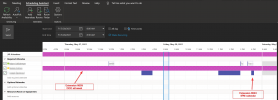
I watched it happening today with my own eyes with 3 different extensions at various times through the day. It was very hit or miss too. I attached a picture of the free/busy status of Extension 8059 and 8024 as these were two I caught while logging data.

I have one user in Costa Rica since a week ago and there calendar is set to "Show As" out of office. Two days ago they called me saying they were Available and they didn't know why. So I set there status to Out of Office again. Today I was testing to try and reproduce what I was seeing by manually changing my status, flipping on a calendar invite. Giving enough time for 3cx to grab my calendar status changes. all with verbose logging on and I couldn't reproduce it. I would never see 3CX set my status if I was already set to a status. So if I was set to Custom Status 2 aka Out of Office I would always show as Out of Office no matter my testing and waiting.

But then I noticed the vacation in Costa Rica Person flipped back to Available as I was testing. From What I saw in the verbose log at what I can only guess is the time of it flipping to Available were these logs that indicate a possible hour long meeting under there all day OOO status in outlook.

Hour long meeting started maybe?
2021/05/28 14:00:00.143|628|0011|Dbg|MYPHONE: UpdateDN - 0.2138ms
2021/05/28 14:00:00.146|628|0011|Trc|MYPHONE: CHECK PROFILE OVERRIDE: UpdateOrInsert schedule for 8059
2021/05/28 14:00:00.147|628|0011|Dbg|MYPHONE: Processed Updated.DN.73: 3.8988ms
Hour long meeting ended maybe?
2021/05/28 15:00:00.001|628|0011|Dbg|MYPHONE: UpdateDN - 0.1947ms
2021/05/28 15:00:00.002|628|0052|Trc|MYPHONE: Generate update event for 8059
2021/05/28 15:00:00.002|628|0052|Trc|MYPHONE: Put verification event for 8059
2021/05/28 15:00:00.002|628|0052|Dbg|MYPHONE: CHECK PROFILE OVERRIDE: Scheduled in 269999997.4399 ms
2021/05/28 15:00:00.004|628|0011|Dbg|MYPHONE: Processed verification of DN.78
2021/05/28 15:00:00.004|628|0011|Dbg|MYPHONE: Updated..0 is ready
2021/05/28 15:00:00.004|628|0011|Trc|MYPHONE: Verification message for DN 8059
2021/05/28 15:00:00.004|628|0011|Dbg|MYPHONE: ExtensionContacts.Count=45
Then me catching it and setting it back to Out of office-
2021/05/28 15:09:11.494|628|0086|Dbg|MYPHONE: 8025 sets Currentprofile of 8059 to Custom 2

Then I noticed for US holiday Extension 8024 was doing a half day. He set himself manually to Away and I observed and noticed in MS teams he was set to offline. I then noticed his away status in 3CX was set to DND, I checked his calendar and he had a short meeting. I then Watched his meeting end and it set his manual Away status to Available Which it's not supposed to do. In the logs I see the following for extension 8024 -

8024 is done for the day, he sets his status to away.
2021/05/28 15:10:00.691|628|0035|Dbg|MYPHONE: Incoming request: messageID=103. (traceid=0HM8EA3FIM7DB:00000001). Current requests: 1.
2021/05/28 15:10:00.691|628|0035|Dbg|MYPHONE: 8024 sets Currentprofile of 8024 to Away
2021/05/28 15:10:00.697|628|0007|Trc|MYPHONE: ###TRANSACTION.21393 started
2021/05/28 15:10:00.697|628|0007|Trc|MYPHONE: Transaction TRANSACTION starts
2021/05/28 15:10:00.703|628|0007|Trc|MYPHONE: +++TRANSACTION.21393 updated - elapsed 5.9918
2021/05/28 15:10:00.703|628|0035|Dbg|MYPHONE: _DAC([103 RequestChangeStatus]) - 00:00:00.0117848 - from 8024[cc977238-1c47-851d-0697-a80aa623a7fd]@10.0.2.10. Requests:1 -> 0 (traceid=0HM8EA3FIM7DB:00000001)
2021/05/28 15:10:00.703|628|0035|Trc|[Microsoft.AspNetCore.Mvc.Infrastructure.ControllerActionInvoker] Executed action ManagementConsoleJS.MyPhone.MyPhoneController.MPWebService (3CXManagementConsole) in 12.3662ms
2021/05/28 15:10:00.703|628|0035|Trc|[Microsoft.AspNetCore.Routing.EndpointMiddleware] Executed endpoint 'ManagementConsoleJS.MyPhone.MyPhoneController.MPWebService (3CXManagementConsole)'
2021/05/28 15:10:00.703|628|0035|Dbg|#352135 (traceid=0HM8EA3FIM7DB:00000001) STOP: POST https://xxxx/MyPhone/MPWebService.asmx processed 00:00:00.0128594
2021/05/28 15:10:00.703|628|0035|Trc|[Microsoft.AspNetCore.Hosting.Diagnostics] Request finished in 13.0479ms 200 application/octet-stream
2021/05/28 15:10:00.704|628|0007|Trc|Updated DN:Wextension.60: 8024 - 0.0032ms
2021/05/28 15:10:00.704|628|0007|Trc|MYPHONE: Finalizing TRANSACTION.21393
2021/05/28 15:10:00.704|628|0007|Trc|MYPHONE: Transaction 21393 ends
2021/05/28 15:10:00.704|628|0007|Trc|MYPHONE: ---TRANSACTION.21393 finished 7.4412ms
Then 4PM I see this event for there extension.
2021/05/28 16:00:00.019|628|0011|Dbg|MYPHONE: UpdateDN - 0.2341ms
2021/05/28 16:00:00.023|628|0011|Trc|MYPHONE: CHECK PROFILE OVERRIDE: UpdateOrInsert schedule for 8024
2021/05/28 16:00:00.023|628|0011|Dbg|MYPHONE: CHECK PROFILE OVERRIDE: Scheduled in 899976.1093 ms
2021/05/28 16:00:00.024|628|0011|Dbg|MYPHONE: Processed Updated.DN.60: 5.3255ms
2021/05/28 16:00:00.024|628|0011|Dbg|MYPHONE: 0 refs of -1217 objects in the queue
2021/05/28 16:00:00.033|628|0007|Trc|MYPHONE: ###TRANSACTION.21408 started
2021/05/28 16:00:00.033|628|0007|Trc|MYPHONE: Transaction TRANSACTION starts
2021/05/28 16:00:00.038|628|0007|Trc|MYPHONE: +++TRANSACTION.21408 updated - elapsed 4.6182
2021/05/28 16:00:00.038|628|0011|Dbg|MYPHONE: Updated.DN.60 is ready
2021/05/28 16:00:00.038|628|0011|Trc|MYPHONE: DN.60 waits for transaction 21408 ready
2021/05/28 16:00:00.044|628|0007|Trc|MYPHONE: Finalizing TRANSACTION.21408
2021/05/28 16:00:00.044|628|0007|Trc|MYPHONE: Transaction 21408 ends
2021/05/28 16:00:00.045|628|0007|Trc|MYPHONE: ---TRANSACTION.21408 finished 11.5515ms
Then at 4:15PM I see this event for the meeting ending and he is not back to away as expected they are available.
2021/05/28 16:15:00.000|628|0033|Dbg|MYPHONE: CHECK PROFILE OVERRIDE: triggered check profile override
2021/05/28 16:15:00.000|628|0033|Trc|MYPHONE: Generate update event for 8024
2021/05/28 16:15:00.000|628|0033|Trc|MYPHONE: Put verification event for 8024
2021/05/28 16:15:00.000|628|0033|Dbg|MYPHONE: CHECK PROFILE OVERRIDE: Scheduled in 299999.4211 ms
2021/05/28 16:15:00.000|628|0011|Dbg|MYPHONE: Updated..0 is ready
2021/05/28 16:15:00.000|628|0011|Trc|MYPHONE: Verification message for DN 8024
2021/05/28 16:15:00.000|628|0011|Dbg|MYPHONE: ExtensionContacts.Count=45

So you can see those are the best I can see in the activity logs for the status changes that aren't supposed to happen. These are a big deal as we do not use the Q button for our call Queues. We use status as the thing that pulls the people from queues. We also use tiered calling and 8024 is Tier 1 and Tier 2 for various Queues and 8059 is Tier 2 when we have a tier 3. We can't have callers getting stuck at these users getting reverted back to available from the calendar sync. Is it best to just turn off the calendar sync?

I also added the freebusy view from outlook attached so you can see what there show as was in outlook.
 

Attachments

  • 3cx auto setting wrong.png
    3cx auto setting wrong.png
    172.9 KB · Views: 5
Last edited:
Hi @aschildmeyerSTR ,

I see what you mean, and despite our best efforts based on the information you have given us, which is very detailed, we cannot replicate this.

I do find something slightly strange though and that is the entry:
Code:
2021/05/28 16:15:00.000|628|0033|Dbg|MYPHONE: CHECK PROFILE OVERRIDE: Scheduled in 299999.4211 ms
It is as if a meeting is triggered immediately the other one finishes at 4:15PM, but I don't see that in the screenshot.

Anyhow, as this is looking like something that may not be as straight forward, I would suggest contacting your 3CX Partner and them in turn possibly elevating it with the 3CX Support Team.

I suspect this will take a bit of investigating to get to the bottom of iit.
 
  • Like
Reactions: ChrisC_3CX
Hi @aschildmeyerSTR ,

I see what you mean, and despite our best efforts based on the information you have given us, which is very detailed, we cannot replicate this.

I do find something slightly strange though and that is the entry:
Code:
2021/05/28 16:15:00.000|628|0033|Dbg|MYPHONE: CHECK PROFILE OVERRIDE: Scheduled in 299999.4211 ms
It is as if a meeting is triggered immediately the other one finishes at 4:15PM, but I don't see that in the screenshot.

Anyhow, as this is looking like something that may not be as straight forward, I would suggest contacting your 3CX Partner and them in turn possibly elevating it with the 3CX Support Team.

I suspect this will take a bit of investigating to get to the bottom of iit.
Thanks for looking @NickD_3CX that is what I found strange as well that the override is for both the scheduled and none schedule.

What is the desired behavior in the status changing from a calendar invite when someone has marked themselves in any status but available manually? I would imagine the manual status setting winning because you wouldn't want to disturb the forwarding rules if someone is on vacation or at lunch etc? So I'd expect if I set myself to away then a calendar event shouldn't mark me DND or any other status. Is that the correct behavior?

Over the weekend I did some testing on my own extension and I have it where it consistently sets me to DND during a meeting no matter what I manually set it to prior to the meeting. We also had a holiday in the US yesterday and I had 100% of my company set to Out of Office to then by the days end only 50% of the company was still set OOO and the remainder was DND or Available. So it appears sometimes DND gets stuck.

I did also observe the ones with the odd behavior are the ones that have setup the mobile app. In my testing I used the mobile app only for setting my tests with a mixture of reoccurring calendar events and normal events with breaks in the middle. Where after every meeting I had to set my status back to OOO or Away.

Before I reach out to a partner can you attempt this test?

  1. Set your self to OOO or Away the night before using your mobile app.
  2. Next day add 1 reoccurring daily meeting 2 hours away from whatever your current time is.
  3. Then add a non-reoccurring meeting like 30 minutes after.
  4. Create a bunch more meetings alternating.
  5. Keep an eye on it through the day into the next day. When you end that day mark yourself on your mobile as away or OOO.
  6. See if the next day causes any calendar oddities with the reoccurring meeting.
  7. Add additional meetings in close succession to the reoccurring meetings.
By doing that it caused my extension to get bunched up where the calendar sync doesn't work proper anymore.
 
What is the desired behavior in the status changing from a calendar invite when someone has marked themselves in any status but available manually? I would imagine the manual status setting winning because you wouldn't want to disturb the forwarding rules if someone is on vacation or at lunch etc? So I'd expect if I set myself to away then a calendar event shouldn't mark me DND or any other status. Is that the correct behavior?
I am glad you asked this because no, if there is a calendar event, regardless what status you have selected, it will change to whatever is dictated in the Calendar event.


About your scenario, I have spent some more time trying out this, not with daily recurring meetings, but try to see if I can somehow get this can be done.
I think this would best be checked with a 3CX Partner.
 
  • Like
Reactions: aschildmeyerSTR
I am glad you asked this because no, if there is a calendar event, regardless what status you have selected, it will change to whatever is dictated in the Calendar event.


About your scenario, I have spent some more time trying out this, not with daily recurring meetings, but try to see if I can somehow get this can be done.
I think this would best be checked with a 3CX Partner.
Alright, thank you @NickD_3CX I think I'll just keep it off for good. We love the feature but we aren't machines and don't follow really planned out schedules. Also since peoples calendars are riddled with appointments when they go on vacation and there out of office clearly has a conflict it will mess up the forwarding rules it looks like as there is times when it would go DND while having an all day out of office on the calendar for being on vacation. I think this feature really only works for super structured people.

Ideally I would rather have it be more like - If user status = Available and has a calendar appointment that is slated show as busy then mark this person DND. But if the person manually set there status to anything but Available then ignore the calendar sync until status is set to available.

Anyways I'm off my soap box. Thanks again.
 
You know, it could actually be those all-day appointments that could be doing this, but I understand your point, if users don't look after their calendar, then indeed the calendar sync can play numbers on them, especially of they are not in the office...

Thanks for the feedback, it is always appreciated! :)
 
Status
Not open for further replies.