


- Joined
- Jun 15, 2014
- Messages
- 47
- Reaction score
- 5
An error has started appearing when setting up Office Holidays, and I can no longer add any additional settings.
The error message is as follows:
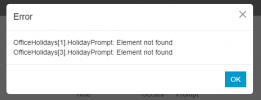
Until now, I was able to do this without any problems, but suddenly an error message appeared and I was no longer able to add any additional settings.
I tried it with other Departments as well, and the same error occurred with all Departments.
When I tried creating new Departments and setting them up, I was able to set them up without any problems, but I was unable to add to existing Departments.
Is there a solution?
The version is "Version 20.0 Update 6 (Build 724 Release)".
The error message is as follows:
OfficeHolidays[1].HolidayPrompt:
Element not found
OfficeHolidays[3].HolidayPrompt:
Element not found
Until now, I was able to do this without any problems, but suddenly an error message appeared and I was no longer able to add any additional settings.
I tried it with other Departments as well, and the same error occurred with all Departments.
When I tried creating new Departments and setting them up, I was able to set them up without any problems, but I was unable to add to existing Departments.
Is there a solution?
The version is "Version 20.0 Update 6 (Build 724 Release)".


