Office Hours on trunk not getting applied

Status
Not open for further replies.

jener

Silver Partner
Basic Certified
Joined
Jul 20, 2022
Messages
29
Reaction score
3
Hi All,

We have a new customer and somehow the office hours are not getting applied on the trunk. If i set office hours on their trunk (they have one) and call one of their did's the phones just rings.
Is there anything i forgot to configure?

best regards,

Erik
 
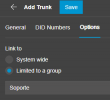
Hello @jener is this trunk limited to a group or system wide?

1689014517050.png

If the trunk is limited to a group then the group office hours will be used.

If it is system wide then global hours will be used.

Also check that the system is not forced to out of office hours, for example check here

I would also check if there is any holiday configured that may forward the calls to the out of office destination.

One last thing, check that the correct time zone is set on the system and OS, run the firewall checker and it must pass successfully.
 
Last edited:
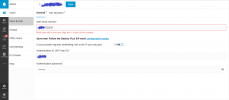
Inbound rules for a DID can also have office hours if "Set up Specific Office Hours for this rule" is checked.
 
Hello @jener is this trunk limited to a group or system wide?

View attachment 36290

If the trunk is limited to a group then the group office hours will be used.

If it is system wide then global hours will be used.

Also check that the system is not forced to out of office hours, for example check here

I would also check if there is any holiday configured that may forward the calls to the out of office destination.

One last thing, check that the correct time zone is set on the system and OS, run the firewall checker and it must pass successfully.

Hi Alejandro,

Thank you for your quick reply on this. I've looked under the trunk options but cannot find the "link to" option there.
Im using version 18.0 Update 7 (Build 312) Enterprise Annual.
 
Inbound rules for a DID can also have office hours if "Set up Specific Office Hours for this rule" is checked.
true, but thats not that case. the customer would like to put the whole pbx in night mode. It's not working with settings -> configure office hours and its also not working on trunk level somehow. im clueless

edit: typo
 
cannot find the "link to" option there
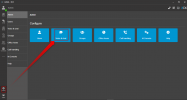
Using the web client or desktop app with the extension that has the rights as system owner or system admin, then you will see the Admin button --- click on voice and chat --- select the trunk and edit it.

1689016921191.png
 
im sorry but that option isnt avaible there, please see attachment.
 

Attachments

  • trunk.png
    trunk.png
    42.8 KB · Views: 15
Hello Jener, if this is a supported voip provider then feel free to open a support ticket in order to check your settings and troubleshoot it.
 
  • Like
Reactions: jener
Hello Jener, if this is a supported voip provider then feel free to open a support ticket in order to check your settings and troubleshoot it.
done, ticket is created (1153963)
 
  • Like
Reactions: Alejandro_3CX
Hello @jener is this trunk limited to a group or system wide?

View attachment 36290

If the trunk is limited to a group then the group office hours will be used.

If it is system wide then global hours will be used.

Also check that the system is not forced to out of office hours, for example check here

I would also check if there is any holiday configured that may forward the calls to the out of office destination.

One last thing, check that the correct time zone is set on the system and OS, run the firewall checker and it must pass successfully.
another thing, im very curious why you have this option in 3cx and i dont. are you using a different version?
 
another thing, im very curious why you have this option in 3cx and i dont. are you using a different version?
The option to limit the trunk to a user group or system wide appears when you create the sip trunk from the admin button using the web client or desktop app. If the sip trunk was previously created from the pbx management console then that option it not shown.
 
in the end it turns out that when you add a DID to a user the PBX automaticly creates an inbound rule wich defaults to call the user anyway :). After i changed al 90 inbound rules its working
 
Status
Not open for further replies.

Forum statistics

Threads
111,974
Messages
590,081
Members
164,899
Latest member
mazet