


- Joined
- Feb 21, 2019
- Messages
- 168
- Reaction score
- 41
In our Malta office we transitioned from an old .com.mt domain to .mt. To do this we did a save, uninstall then re-install with the new domain then a restore. All went well and we've been using the system for several months.
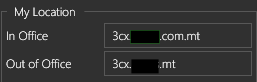
Yesterday, a user from that office was working in a North America office and could not make calls, seeing "Call failed" errors. When I checked their softphone config (Three blue dots > Configure Accounts > Profile) I see the "In Office" domain is the old .com.mt domain where the "Out of Office" is set to the .mt domain. I sent them a new config file, but the same thing resulted.
Testing showed everyone in that office has the same flawed config. I manually amended the config XML for that user to remove the old domain and the ext now works, but new Welcome email configs still have the old domain. I checked the 3CX server settings and only see the new domain under Phone Provisioning and the FQDN in Networking is correct. I also searched the parameters for the old domain, but see nothing but the correct domain. Where is this old domain coming from? We are decommissioning the old domain and need to correct this.
Thanks.
Windows 2019 Server, On Prem.
3CX Enterprise, v18.0 (Build 461)
Yesterday, a user from that office was working in a North America office and could not make calls, seeing "Call failed" errors. When I checked their softphone config (Three blue dots > Configure Accounts > Profile) I see the "In Office" domain is the old .com.mt domain where the "Out of Office" is set to the .mt domain. I sent them a new config file, but the same thing resulted.
Testing showed everyone in that office has the same flawed config. I manually amended the config XML for that user to remove the old domain and the ext now works, but new Welcome email configs still have the old domain. I checked the 3CX server settings and only see the new domain under Phone Provisioning and the FQDN in Networking is correct. I also searched the parameters for the old domain, but see nothing but the correct domain. Where is this old domain coming from? We are decommissioning the old domain and need to correct this.
Thanks.
Windows 2019 Server, On Prem.
3CX Enterprise, v18.0 (Build 461)


